
Delta C2000 Programming Manual
Software
- Install the software: M:\Production\Products\Spindles\VFDs\Delta VFDs\Software\VFDSoft v1.56.exe
Uninstall the old version first!
Our virus protection doesn’t like it.
- On 64 bit windows, run M:\Production\Products\Spindles\VFDs\Delta VFDs\Software\64 bit driver\CP210xVCPInstaller_x64.exe or see attached VFDSoft v1.56.zip.
- Search for VFDSoft in the search bar to find it after you install it.
- Find the com board of the Silicon Labs CP210x USB to UART Bridge. For example, below it is COM9.
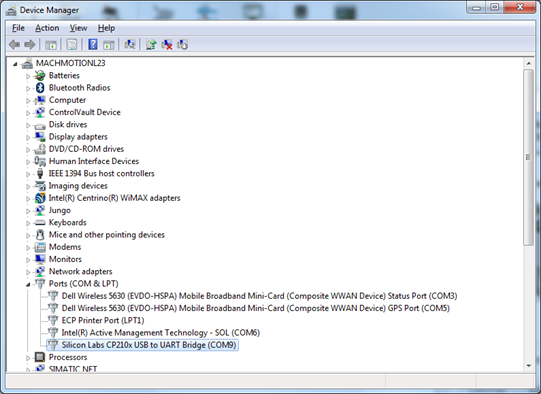
5. Program the baud rate first if it is something other than 9.6kHz in the program (Pr 09-01). Software will crash if it’s different. MachMotion default is 115.2. This is the default MM config
6. Program the VFD using the standard Delta Cable as used on our Lathe department
-
-
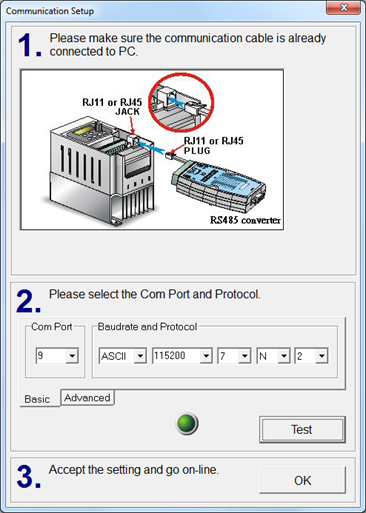
- Use these settings: Usb - RS485, 9600, - 7 - N – 2
- Select the correct COM port found before
- Press Test
- Then you can enter in the program
-
Formulas
Frequency = Max RPM * Number of Poles / 120
Number of Poles = 120 * Frequency / Max RPM
Parameters
-
Always start with a factory reset.
- Set 00-02 to 10
- Set 00-02 to 6 (Not for E Series VFD)
- Restart the VFD power
- Setup the parameters as follows:
Pr 01-00 = Maximum frequency
Pr 01 - 02 = Maximum voltage
Pr 05-02 = Motor1 Rated P = Motor kw (Google to convert Hp to kw)
Pr 05-01 = Motor1 Rated A
You will have to set Number of Poles to 2 for anything above 1700 RPM download and then you will be able to change it to 3600 rpm
Pr 05 - 04 = 2 Number of Pole for 3600 base RPM 60Hz
Pr 05 - 04 = 4 Number of Pole for 1800 base RPM 60Hz
Pr 01-12 – Acceleration time in seconds – Leave at 10 seconds – the default
Pr 01-13 – Deceleration time in seconds – Leave at 10 seconds – the default
Standard IO parameters (Should already be setup when coming from MachMotion)
|
Parameter |
MachMotion Default |
Description |
|
00-20 |
2 |
Source of master frequency command – Set to external analog input |
|
00-21 |
1 |
Source of operation command – Set to external terminals |
|
|
|
|
|
02-16 |
2 |
Output MO1 – operation speed attained |
|
02-17 |
34 |
Output MO2 – Zero speed (actual output frequency) |
|
03-20 |
3 |
Analog output config – Output current (RMS) |
|
06-44 |
1 |
STO Latch Selection - No latch |
Enable Brake Resistor
Pr 06-01 = 0 (turn off Over Voltage Stall Prevention)
Note: Nothing special is needed to setup the VFD for a Brake Unit, such as a vfdb4045.
More info for braking units: http://www.deltronics.ru/images/manual/VFDB-4110-4160-4185_I_EN_20101011.pdf
More info for brake resistors: http://www.deltronics.ru/images/manual/Brake_datasheet_08214.pdf .
Auto Tuning
MAKE SURE 00-11 is set to 0 before doing any auto tuning.
|
Parameter |
MachMotion Default |
Description |
|
05 - 01 |
|
Full-load Current of Induction Motor 1 (A) |
|
05 - 03 |
|
Rated Speed of Induction Motor 1 (rpm) |
|
|
|
|
|
05 - 02 |
|
Rated Power of Induction Motor 1(kW) |
|
05 - 05 |
|
No-load Current of Induction Motor 1 (A) |
|
|
|
|
|
|
|
|
Do both types of tuning:
Dynamic Tune – ONLY USED IF MOTOR NOT CONNECTED TO MACHINE
Pr 05-00 = 1
- Set the value
- Turn on the spindle FWD (By pressing RUN on the VFD or running M3 in Mach4)
- Wait until it stops moving
Set Pr 05-00 to 0 to turn off auto tuning if using the software.
Static Tune
Follow directions for dynamic tune except set PR 05-00 to 2.
Orient
|
Parameter |
MachMotion Default |
Description |
|
11-44 |
|
Accel time for orient (sec) |
|
11-45 |
|
Decel time for orient (sec) |
|
00-11 |
3 |
Control of speed mode (Must be FOCPG for an induction motor) |
|
02-01 |
35 |
MI1 configuration – Enable single point position control |
|
02-14 |
39 |
Output Relay Y2 – Position attained |
|
10-00 |
1 |
Encoder selection (ABZ) |
|
10-01 |
|
Encoder lines per rev – 1000 for a 1000 line encoder (Mach4 will display 1000 lines as x4 or 4000 counts) |
|
10-02 |
1 or 2 |
Encoder direction – change this if the motor starts moving and then never stops. Will be 1 (encoder in line with motor) or 2 (encoder opposite of motor) |
|
10-19 |
|
Orient position – where do you want the spindle to stop |
|
10-20 |
|
Range to call at orient position (if the motor is +- 10-20 of 10-19, it will say it’s oriented) |
Orient with gear shifter
|
Parameter |
MachMotion Default |
Description |
|
10-04 through 10-07 |
|
Electrical gear ratios |
|
|
|
|
Define one of inputs as 48 “Mechanical gear ratio switch.”
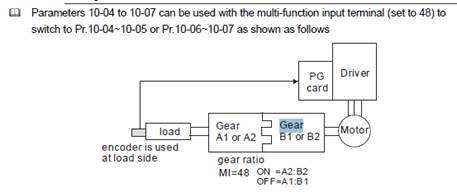
10-04 Electrical Gear at Load Side A1
10-05 Electrical Gear at Motor Side B1
10-06 Electrical Gear at Load Side A2
10-07 Electrical Gear at Motor Side B2
Tuning Orient
11-24 Gain
11-25 Forward Gain
11-26 Time in seconds to position
High Torque Motor
To get a Centerless grinder wheel to turn on you may need to set these parameters:
Pr 01-43 = 12 - 12 V/F Curve Selection (High starting torque (60Hz) )
Pr 01-04 = 50V - Mid-point Voltage 1 of Motor 1
You may have to play with Pr 01-04 if you get Overloads.
Delta downloads
Diagnostics
Orient not working
- Check inputs on screen
- 1 fwd
- 2 rev
- 5 orient
- Check leds on encoder board
- See index led flashing
- Encoder come in on screen
- Parameters
- Control mode set to 3
- Input m0 set to 35
Contacts for Delta
- Vincent Huang
- Direct Line (will transfer to Mobile if desk is not picked up): (919) 767-3882
- Tony Obrain
- 317-997-4303
- Reuben
- Cell: 919-247-1348
- David
- 919-767-3804
- Chester Hsieh
- Direct Line (will transfer to Mobile if desk is not picked up): (919) 767-3907