
Alarms
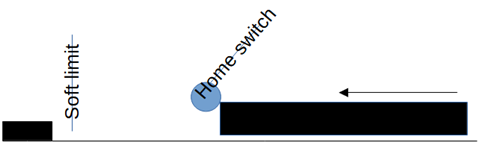
- Originally equipped with home/limit switches and hard stops
- Modified to accommodate larger parts by extending axis travel
Key changes:
- Repurposed switches:
- Now function solely as home switches
- Work in conjunction with absolute encoders for accurate positioning
- Implemented soft limits:
- Provide adjustable stop points before reaching hard limits
- Some soft limits set very close to hard limits for maximum part size capacity
- Process larger parts than initially designed for
- Maintain precise positioning and safety features
- Offer flexible, adjustable working envelopes
The combination of home switches, absolute encoders, and soft limits ensures both extended range and operational safety.
While the machine is now capable of handling these large parts, operators should remain vigilant and follow proper procedures to avoid triggering limit-related alarms.
Operator awareness:
- Exercise caution when running large parts
- Be prepared for potential alarms related to part size
- Ensure proper part setup and alignment to minimize risks
RapidPath or RSI position errors;
Servo drives control motion by commanding steps or pulses of motor shaft rotation. This precise control relies on a feedback mechanism that reports actual motion back to the servo. Here's how the system works and why position errors occur:
- Command and Feedback Loop
- The servo drive issues motion commands in discrete steps.
- A feedback device (e.g., encoder) reports actual motor movement.
- The servo continuously compares commanded vs. actual position.
- Position Error Detection
- A fault occurs when the gap between commanded and actual position becomes too large.
- Typically, this threshold is around one full motor shaft rotation.
- This safeguard prevents potential physical damage to the machine.
- Causes of Position Errors
- Physical obstructions blocking the intended motion
- Mechanical issues within the system
- Electrical problems affecting motor performance
- Error Reporting
- The servo will halt operation and report a position error.
- The fault message includes the name of the affected axis.
By monitoring these position errors, operators can quickly identify and address issues, ensuring smooth and safe machine operation.
Commanded over soft limit, axis _________
One of the unique features of G-Code is look-ahead. The G-code interpreter is set to look 20 lines ahead on the code. This helps it to optimize movements, and prevent hardware crashes. This can make it a little tricky to identify the G-Code command that is triggering the error - because the problem will usually be well below the line where it stopped.
When this happens on the Kountry Wood system, carefully check the part dimensions, positioning, and the distance to the hard limits. You may need to adjust the soft limits to accommodate a larger part.
Over torque alarms
These alarms occur when an axis is up against a hard limit, or against an obstruction in its travel. This will probably happen right after you've adjusted the soft limits. Does the axis have enough travel to complete the commanded motion without hitting the hard stop? If not, you may need to adjust the machine hardware.
Other alarms
If you have other alarms that repeat, or that you are unable to resolve, please call MachMotion technical support and email a picture of the error message on the screen. (support@machmotion.com)