
Altair 300

MachPro 26 CNC Software Roadmap
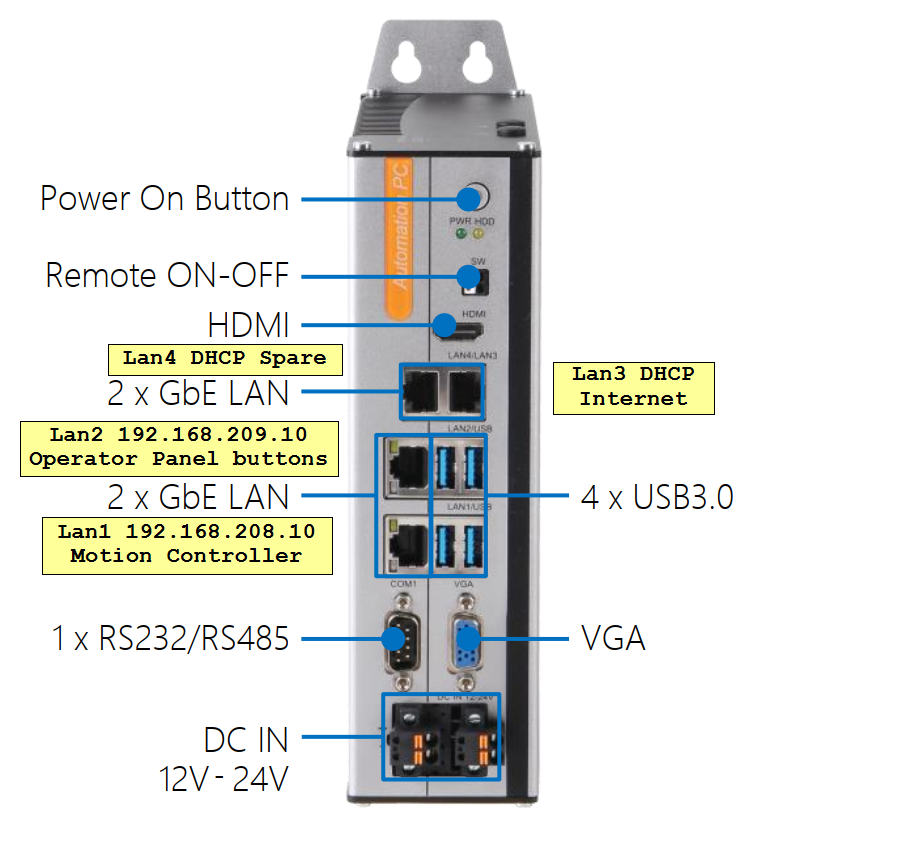
The Altair 300 is an industrial PC designed for use in a control cabinet. The full manufacturer's specifications are attached in the upper left portion of this screen. Basic specifications:
- Intel Core i5 with 16GB of memory and a 256GB SSD hard drive
- 12-24VDC power, 120W max consumption
-
MachLabs installs Windows 11 IoT Value for i5 processor, version 22H2, build 22621
These are the steps to connect your Altair 300 for use.
|
 |
| http://www.mach-labs.com | MachLabs Documentation | support@mach-labs.com |
The MachLabs Team
14518 County Road 7240, Newburg, MO 65550
support@mach-labs.com