
Yaskawa V1000 / A1000 / GA500 Modbus VFD Installation
{{@672}}

1. Wiring
Control Cable: The VFD Control cable is the green Ethernet cable that runs from the Yaskawa VFD to the Control PC as shown in Figure 1. Or if you have an Apollo III motion controller, connect the VFD control cable into Ethernet 1 Port on the Apollo III.

(Figure 1 Ethernet Connection to Control PC)
Spindle Motor: Connect your spindle motor to the terminals labeled U/T1,V/T2, and W/T3 as shown in Figure 2. If your spindle moves the wrong direction when you turn it on, just swap any three of the (U,V,W) leads.

(Figure 2 Spindle Motor Connections)
Brake Resistor: Connect your brake resistor by placing the two wires on the +2/B1 and B2 terminals as shown in Figure 3.
(Note: If needed to extend the wires use High Temp rated wire.)
Mount Resistor: Mount the resistor to the cabinet. Wire as shown in Figure 3.
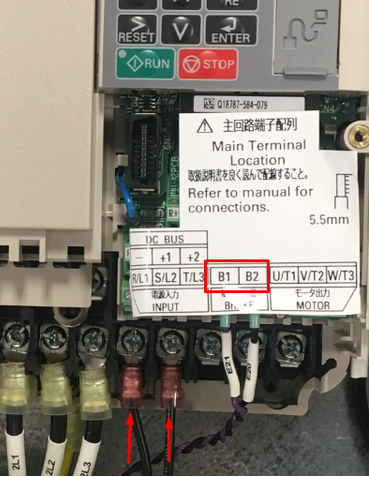
(Figure 3 Yaskawa Resistor Connections)
Thermistor: If your spindle has a thermistor, please make sure to connect it. Use the following knowledge base from Yaskawa for more information: Motor Protection Using Positive Temperature Coefficient (PTC) Thermistors. You must also switch the A3 dip switch (analog 3 input) to Voltage.
2. Programming
VFD Programming
To program the VFD you will need to utilize the Mach4 software. While the control is disabled follow the next few steps.
Step 1: Click on Configure -> Plugins -> MachMotion (as shown in the pink box in Figure 4).

(Figure 4 Access the MachMotion Plugin)
Step 2: While in the MachMotion Plugin Type "Yaskawa" in the search field as shown in Figure 5.
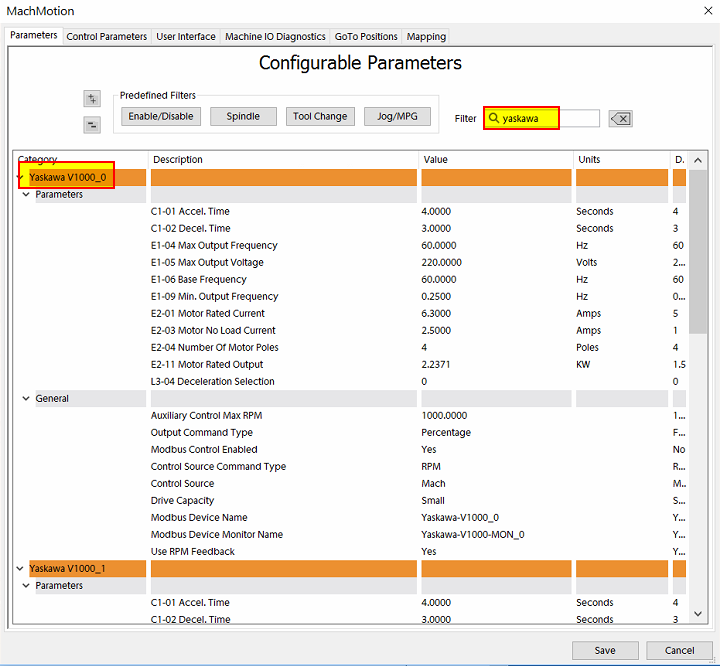

(Figure 5 Search Field)
Step 3: This will displaypopulate the parameters for the Yaskawa VFD V1000.V1000 Note(as thatshown if there are multiple VFDs, then the additional units will be labeled V1000_1, V1000_2, etc.
below).
Note: All Mach Parameters will be labeled as "Yaskawa V1000_0" even for V1000, A1000 and GA500 type VFDs.
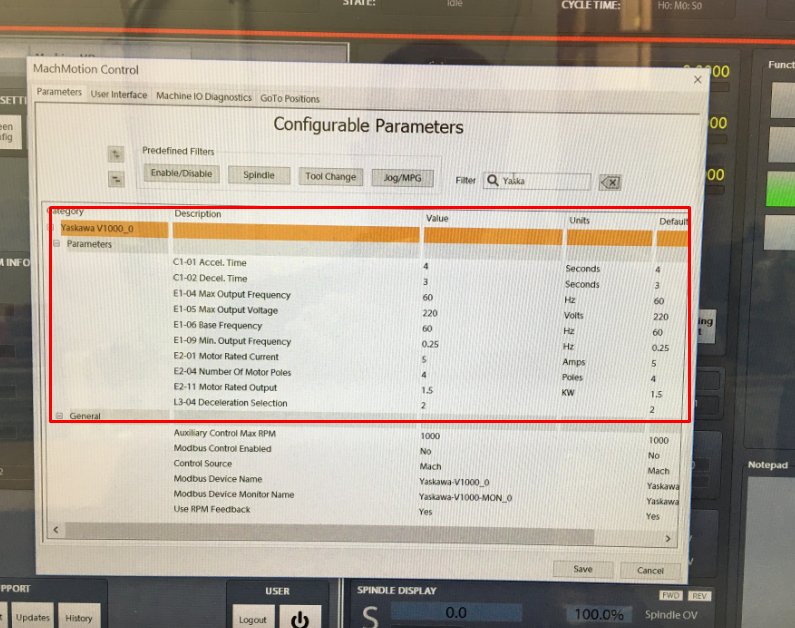
(Figure 6 Yaskawa V1000 Default Parameters)
Step 4: Enable the VFD.
For a main spindle, set the values to these values:
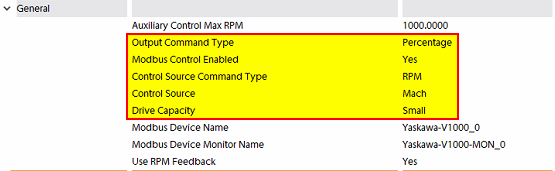
For large VFDs you must also select Drive Capacity to Large or the VFD will run at only 10% of the commanded speed. Set the Drive Capacity according to this table: https://support.machmotion.com/books/motors-drives-and-vfds/page/yaskawa-vfd-capacity-tables.
Older VFDs had a different parameter set and the Output Command Type was set to Frequency.
If you are getting incorrect results, try changing the Control Source Commandto TypeMach fromand RPMModbus Control Enabled to Percentage.
For any other spindle like a grind wheel, regulating wheel, or sub spindle, set:set Control Source to Auxiliary and Modbus Control Enabled to Yes.
Us the table in the following link when setting the Drive Capacity to either large or small. Most of our drives are small. 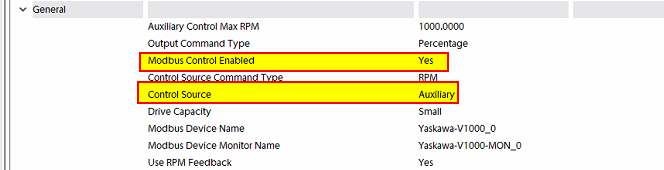
Step 5: Set up the motor parameters
Find your motor nameplate and enter in the parameters based on the table below.
If you cannot locate the motor’s base frequency, the name plate should tell you how many poles there are on the motor. You can also call the motor manufacturer to figure out the number of poles. Using the motor’s maximum RPM and its number of poles, you can calculate the base frequency with the formula below:
Motor Poles = 120 * Max Hz / Max RPM
Base Frequency = Rated RPM * Number of Poles / 120
Max Frequency = Max RPM * Number of Poles / 120
If the VFD is a V1000, then E2-11 the kW value of the motor.
If the VFD is a GA500, then E2-11 is the HP value of the motor.
Yaskawa V1000 Parameters
| Parameters | Description | Default | Range |
| C1-01 | Accel. Time | 4 Seconds | 0.0 to 600.0 Seconds |
| C1-02 | Decel. Time | 3 Seconds | 0.0 to 600.0 Seconds |
| E1-04 | Max. Output Freq. | 60 Hz | 40.0 to 400.0 Hz |
| E1-05 | Max. Output Voltage | 220 Volts | 1.0 to 510.0 Volts |
| E1-06 | Base Frequency | 60 Hz | 1.0 to 599.0 Hz |
| E1-09 | Min. Output Freq. | 0.25 Hz | 0.0 to 599.0 Hz |
| E2-01 | Motor Rated Current | 5 Amps | 10% to 200% of drive rated current |
| E2-04 | Number of Motor Poles | 4 Poles | 2 to 20 Poles |
| E2-11 |
Motor Rated Output V1000 GA500 |
1.5 kW |
0.00 to 650.00 kW use kW value use HP value |
| E2-03 | No Load Current | 40% of Motor Rated Current | |
| L3-04 | Deceleration Selection | 0 |
0 to 7 0 = Brake Resistor 1 = No Brake Resistor 2 = Default |
| C1-09 | Emergency Stop Deceleration | 3 Seconds |
0.0 to 600.0 Seconds (This parameter must be changed inside the VFD at this point) |
| L8-07 | LF Output Phase Loss | 0 |
Sometimes we need to set this to 0 to disable that alarm |
| C6-02 | Carrier Frequency Selection | 02 |
Used on High Speed Spindles to set Carrier Frequency to 5KHz |
Any time you change any of the E1 or E2 parameters, you must restart Mach4 to get the new parameters to download into the VFD.
For advanced applications, you may need to use DC Injection Braking.
| Parameters | Description | Default | Range |
| B1-03 | Stopping Method | 02 |
|
| B2-01 | DC Injection Start Frequency | .5 | Sets
When |
| B2-02 | DC Injection Time At Stop | .5 | This sets how long you want DC injection braking |
| H1-05 | Set to 60 to have S5 activate DC Injection Breaking Mode for Orient or other related function. | 60 | N.A. |
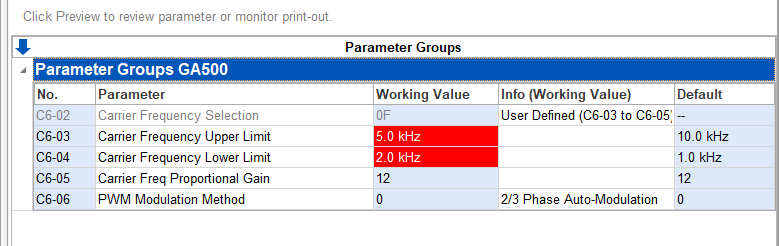
Note: If you get an SCF alarm on deceleration, it's because DC injection breaking is enabled. Set C6-02 to 2 (for high frequency jobs change C6-04 to 2 and C6-03 to 5khz). Changing the carrier frequency allows for a more sinusoidal wave on the output and it does not interfere with the safety circuit.
Overspeed a Motor
If you want to command your spindle motor or grinding wheel to go faster than the base frequency, command the spindle to go max RPM and use a tachometer to measure the speed. Then use the following formula to calculate your new Max Output Frequency (E1-04):
Desired Max RPM * Current Max Frequency / Current Max RPM = New Max Frequency
For example, if your Current Max Frequency is 60 and you measure the spindle runs 1030 RPM but you actually want it to go 1515 RPM, calculate your new Max Frequency as follows:
1515 * 60 / 1030=88 Hz.
Make sure to recalibrate your RPM feedback and your spindle speed as both shown below.
Calibrate Spindle Speed
IfDoes your V1000CNC iscontrol setupneed it? Yes - it needs to be accurate enough to meet your needs.
- The rated speeds and feeds for your tools and materials should perform as expected.
- You should have comparable performance across all your machines when running the same spindle speed.
- Accurate spindle calibration enables you to make cleaner and more accurate cuts – improving the quality of your final product.
- Scheduled preventative maintenance should include verification of the accuracy of the system, including the spindle speeds.
This documentation focuses on knee mills as a Machcommon example and is adaptable to other machines.
Spindle control methods
This is all configured during the installation. This document assumes that the parameters for the motor have been correctly entered, and the VFD and motor are operating correctly. The last step in the spindle (undersetup MachMotionwill Parameters),be clickspeed oncalibration.
Analog ->0-10v Controlfrom atthe topApollo III is managed through the face of the Machdrive screen.with ThenYaskawa selectDrive Wizard software. Please call MachMotion for assistance with this process.
Ethercat VFDs are configured through RapidPath. RapidPath sends a speed command to the "Spindle"VFD tab– shownoften an RPM command. If that implementation is correct, you should have accurate spindle speeds. Small calibration adjustments can be made in Figurethe 7.Mach configuration spindle tab, and that is documented below. If your spindle speeds are significantly off, you need to contact MachMotion support for assistance.
Modbus is our preferred method to manage a VFD as of 2024 and a modbus system is configured below.
Definitions
Machines often have both gears and speed controls.
The control needs to know which physical gear is engaged to control the spindle motor for the correct speed. If you use multiple gears on your machine, there will be gear change buttons on the screen, and you can also use M-code commands to change gears. When you command a gear change, the software will prompt you to make the physical gear change, then it will change the software parameters to match.
The speed control needs to be set to the maximum and left there. Going forward the VFD will provide the full speed range within each gear.
Set MaxRPM values for each gear
Note: The MaxRPM is where you adjust the maximum tool RPM. To calibrate the TSpeed adjust the feedback ratios. You can overspeed a motor using these instructions.
Enter the manufacturer provided RPM values into the spindle configuration
Pull down Configure | Control | Spindle tab
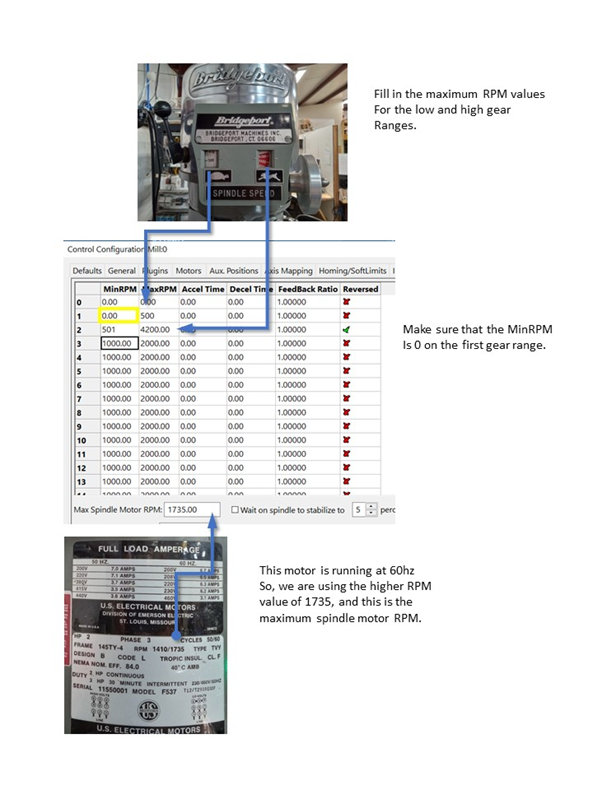
If you have a tachometer, you can set the MaxRPM to the RPM reported by the tachometer.
- Temporarily set all MaxRPM values to twice the labeled RPM on the speed control.
- Set up so that you can verify that the VFD is sending the maximum Hz to the spindle (see next section)
- Run your machine in each gear range with the temporary MaxRPM values you used above. Verify that the VFD is putting out maximum Hz. Record the actual MaxRPM values from the tachometer for each gear range.
- Enter the actual MaxRPM values that the tachometer reported in the spindle tab.
Verify that the VFD is sending maximum speed commands to the spindle
You want to know that the VFD is telling the spindle motor to run at full speed. Assuming the motor is configured to run at 60 Hz, then if the VFD is sending 60 Hz, the motor is running at full speed. You just entered the MaxRPM values into the spindle config. Set your maxmachine for one of the gears and run the spindle at the MaxRPM. You can check the VFD output two ways, and both are equally accurate:
- With the enclosure door open, check the LED on the VFD. This VFD is running at P44.59% of 60 Hz = 26.754 Hz. The "P" prefix on the number indicates the number is a percentage. Use the up or down buttons to cycle through the display. A V1000 will show the frequency with an "F" prefix. A GA500 will show the frequency with a "-" prefix.
- Open a web browser and enter this IP address in the search bar 192.168.208.90. It will open a welcome page for the VFD with two buttons at the bottom. Click the Monitor button and look for the Output Frequency line. This is the same machine running at the same time, and it also reports 44.59% = 26.754 Hz.
|
|
|


Adjust feedback ratios for TSpeed
Note: To adjust maximum actual tool RPM Set MaxRPM values for each spindle range here. gear

(Figure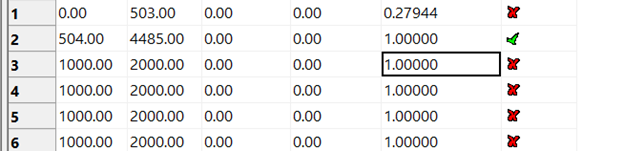
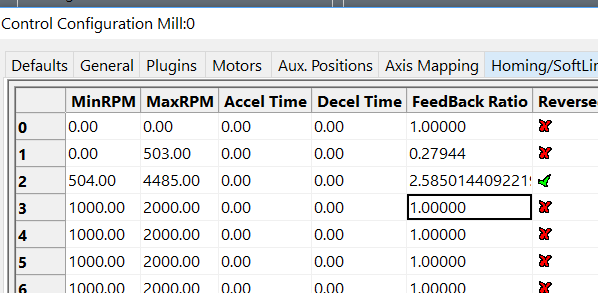
My starting feedback ratio is 1.0000 for both gears, and I am going to calibrate gear 2.
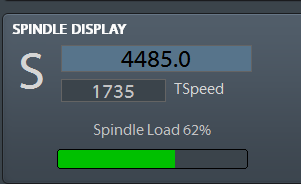
I set my S value to 4485, which is my MaxRPM, and run the spindle. The TSpeed reports 1735.
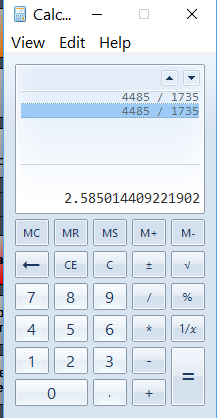
I divide the commanded RPM by what the software is reporting and use the result as my feedback ratio for gear 2.
Now I run the spindle again with same commanded RPM of 4885
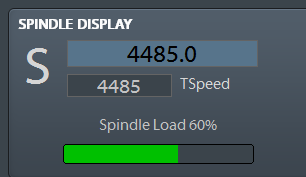
Note: the feedback ratio only adjusts the value in the TSpeed field. It does not have any effect on the actual RPM of the spindle.
Auxiliary Spindle Tab)
MaxRPM
If your VFD is enabled as an Auxiliary spindle (under MachMotion Parameters), set the Auxiliary Control Max RPM to the max RPM of the motor.

Calibrate RPM Feedback
If your VFD is enabled as a Mach spindle (and there can only be one enabled at a time), follow the procedure below.
You will need to scale your emulated RPM feedback in the Mach software. Calculate your feedback ratio as follows:
Max Spindle RPM / 3600 = Feedback RatioACTUAL Tool RPM / Shown TSpeed RPM * Value currently in Feedback Ratio in Spindle Param Tab. (Use a Tach and get the actual RPM. Divide the Actual RPM by the displayed RPM in the "TSpeed" register in the "SPINDLE DISPLAY". Multiply that value by whatever value is currently in the "Feedback Ratio" section of the Spindle Tab.
Then while the control is disabled follow the next few steps:
Step 1: Click on Configure -> Control at top of the Mach screen. Then select the "Spindle" tab shown in Figure 7.
(Figure 7 Spindle Tab)
Step 2: Enter in the value you calculated in FeedBack Ratio from the calculation you have done for Spindle Gear 1 as shown in Figure 8.

(Figure 8 Enter Feedback Ratio)
Troubleshooting
Deceleration
If you have issues getting the spindle to stop completely try setting B2-04 to 2.00sec
RPM Incorrect
If the VFD is setup correctly but the VFD does not go the correct RPM, check the S7 input. For a delayed safety relay S7 must be set to Fast Stop (N/C) or H1-07: 17. By default Yaskawa sets S7 to Fast Jog which will allow the VFD to run when you command it but only at a locked speed and only in one directly (one direction as far as we know). For more information, see Yaskawa V1000 / A1000 / GA500 / GA800 TCP Modbus Communication Setup.
Webpage
For TCP modbus VFDs, you can go to the webpage to view the status of the VFD. Normally the IP address is 192.168.208.90.
VFD Monitor Panel
You can use this panel to test VFD operation.

Alarms
If you were to get an alarm on the VFD you will receive a message on the computer screen from the Global Message System. In the description of the alarm it will describe the necessary steps to try to resolve the alarm.
Setup Verification
To test any modbus VFD, review the following items to confirm it is setup correctly:
Does the VFD run the spindle? The VFD RUN light should be on solid when it is up to speed. If it isn't, the VFD is not programmed correctly.
Does the RPM change when you change the spindle speed on the control?
Does the VFD go both directions?
If you disconnect the VFD control cable does the control time out with a VFD Disconnected Error?
Is the RPM feedback correct?
Does up to speed and at speed work correctly inside the control?
SCF Fault
Although the Yaskawa manual says it's only caused be a safety relay input issue (and likely a bad drive), we've found that DC injection braking can cause this to fault. Disable DC injection breaking and it should fix it.
Appendix
Default IO Mapping
Modbus
Inputs

Outputs - none required.
Spindle Load

Apollo III
Make sure the VFD is powered all the time. Otherwise the VFD will not connect correctly.
Wire the Estop circuit as shown below:

{{@677}}