
MachPro Waterjet Setup Manual

Introduction
Configure your motion controller including: axis calibration, homing, limits, and I/O
Setup the first jet
Every waterjet will need most of following signals for each jet. Map each of the ones you need to the correct output.
| Name | Function |
| Jet Pump Output | This turns on the actual intensifier pump. If using a PLC this should trigger the PLC to start the intensifier. Often called Intensifier on. |
| Jet High Pressure Output(s) | Turns on and off high pressure for the corresponding jet. Also called things like UHP On, high pressure on. |
| Jet Abrasive Output(s) | Turns on and off abrasive for the corresponding jet. |
| Jet Pressure Output(s) | Turns on and off the actual jet. Often called Water On or Jet On. |
Pull down Configure -> Control -> Settings tab
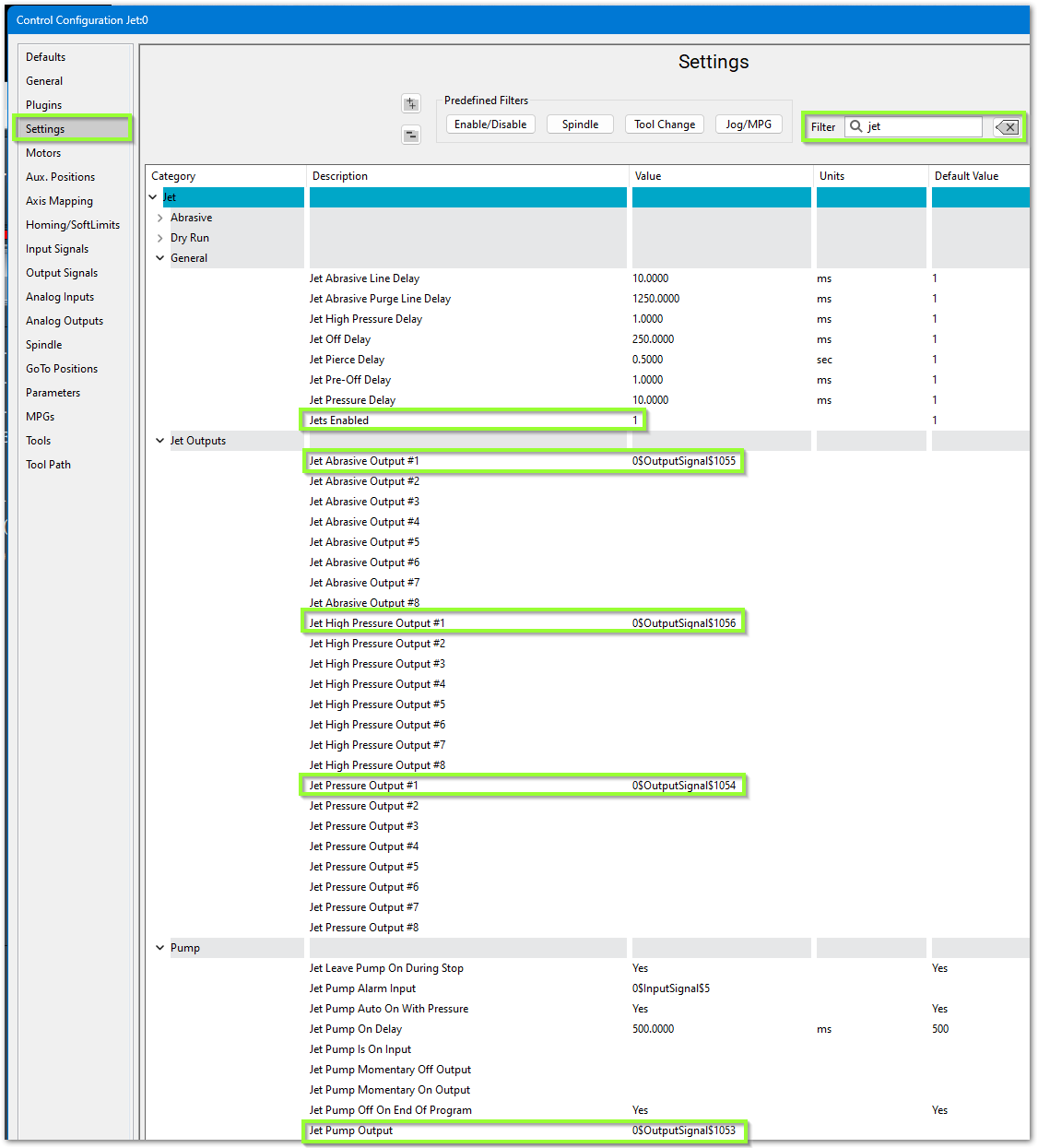
- In the upper right corner, filter the settings for jet
- Set Jets Enabled to 1
- Configure the software to use your previously mapped signals
- Jet Pump Output #1 maps to Pump or Intensifier ON
- Jet Pressure Output #1 maps to Jet Pressure On
- Jet Abrasive Output #1 maps to Abrasive On
- Jet High Pressure Output #1 maps to High Pressure
Jet Delay Settings
There are default jet delay settings which you may adjust.

Jet Pressure Delay (ms) “JetPressureDelay”- Turns Jet on, then applies delay, then turns on Abrasive.
Jet Pre-Off Delay (ms) “JetPreOffDelay”- Applies delay, then turns Jet off.
Jet Off Delay (ms) “JetOffDelay”- Turns Jet off, then applies delay.
Jet Pierce Delay (sec) ““JetPierceDelay”- Turns Jet on, then applies delay.
Jet High Pressure Delay (ms) “JetHighPressureDelay”- When “High Pressure Toggle” is high, it applies the delay, then turns on Jet and Abrasive. No yellow wait bar appears.
Jet Pump On Delay (ms) “JetPumpAutoOnDelay”- Turns on Pump, applies delay, flashes button until delay is over
Jet Abrasive Line Delay (ms) “JetAbrasiveDelay”- Turns Jet and Abrasive on at the same time. Then applies the delay. Identical to “Jet Abrasive On Delay” and “Jet Pierce Delay”.
Jet Abrasive On Delay (sec) “JetAbrasiveOnDelay”- Turns Jet and Abrasive on at the same time. Then applies the delay. Identical to “Jet Abrasive Line Delay” and “Jet Pierce Delay”.
Jet Abrasive Off Delay (sec) “JetAbrasiveOffDelay”- Turns off Abrasive, applies delay, Turns off Jets. Identical to "Jet Abrasive Purge Line Delay"
Jet Abrasive Purge line Delay (ms) “JetAbrasivePurgeDelay”- Turns off Abrasive, applies delay, Turns off Jets. Identical to “Jet Abrasive Off Delay”.
Alarm Setup
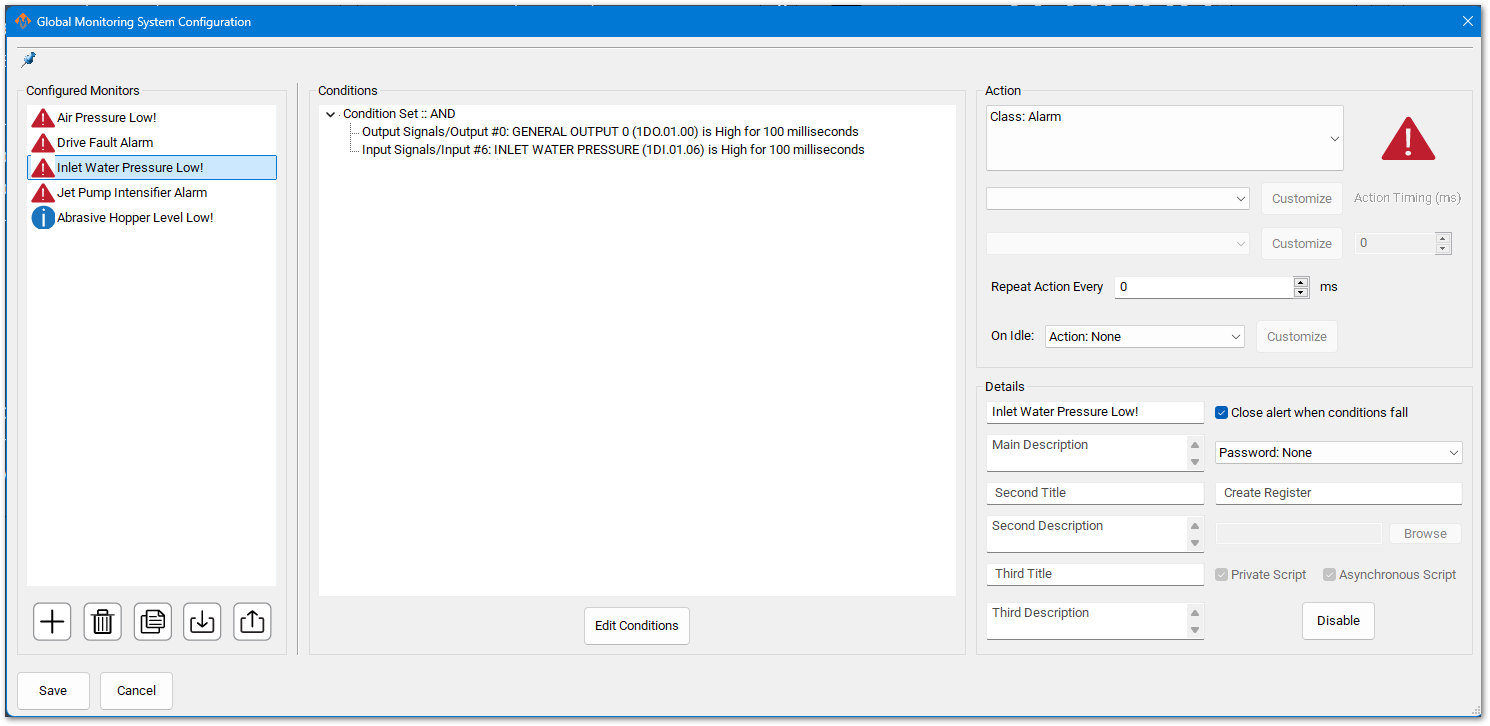
Pull down Configure -> Plugins -> Global Monitoring System (GMS)
You may have inputs for Low Inlet Water Pressure. Configure a GMS to monitor this signal as follows:
Servo Abrasive Setup
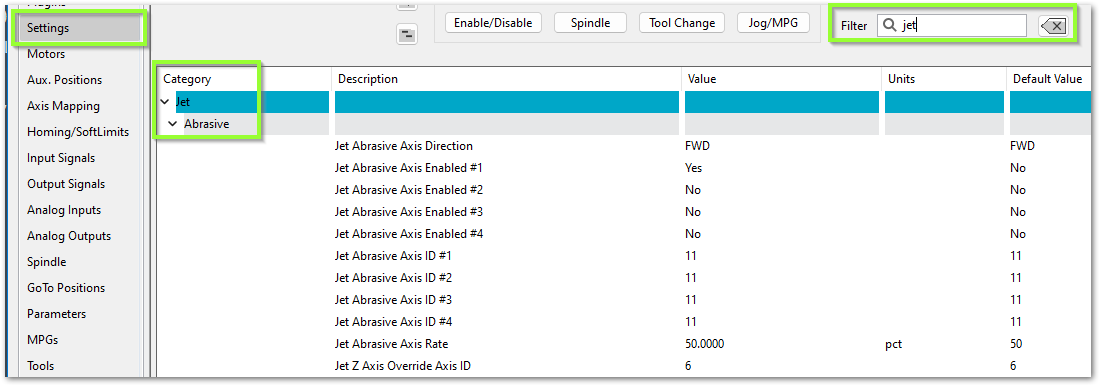
Some waterjets have a servo controlled Abrasive. For that use these settings:
| http://www.mach-labs.com | MachLabs Documentation | support@mach-labs.com |
The MachLabs Team
14518 County Road 7240, Newburg, MO 65550
support@mach-labs.com