
MachPro GCode WaterJet and Plasma Header Parameters
Introduction
| MachPro Version | 2026 mid-July release |
Overview
GCode Header Parameters let Mach read setup values from the top of a loaded G-code file and automatically push those values into OEM registers or machine-specific handlers. This is intended for program metadata such as cut heights, pierce delays, target voltage, abrasive rate, pressure, and material selection.
Header processing runs when a new G-code file is loaded into Mach. The common GUI module scans only the first configured number of lines and applies the first valid match it finds for each supported option.
How It Works
- The feature reads the first GCodeHeaderParametersLinesToSearch lines from the currently loaded G-code file.
- It only runs when the OEM parameter GCodeHeaderParametersEnabled is set to Yes.
- Matching ignores spaces, hyphens, and underscores in header names. For example, Pierce Height, Pierce-Height, and Pierce_Height all match the same option.
- A value may follow the option name directly or after : or =.
- The first valid value found for each option wins. Later matches for the same option are ignored.
- Numeric matches are written to OEM registers or passed to machine-specific numeric handlers. String matches can call machine-specific handlers such as material activation.
This is a flexible top-of-file scan. The supported text does not need to be in a rigid block format as long as the recognized option name and value appear in the first scanned lines.
Matching Examples
(Pierce Height: 0.150)
(Pierce-Height=0.150)
(Pierce_Height 0.150)
(Cut Speed: 125.0)
(Target Voltage 122)
(Material ID: SS03)
(Rotation: 0.00 degrees Target Voltage 122, Material ID: SS03)
Setup
Disable the software
Pull down Configure -> Control -> Settings Tab -> filter for gcode
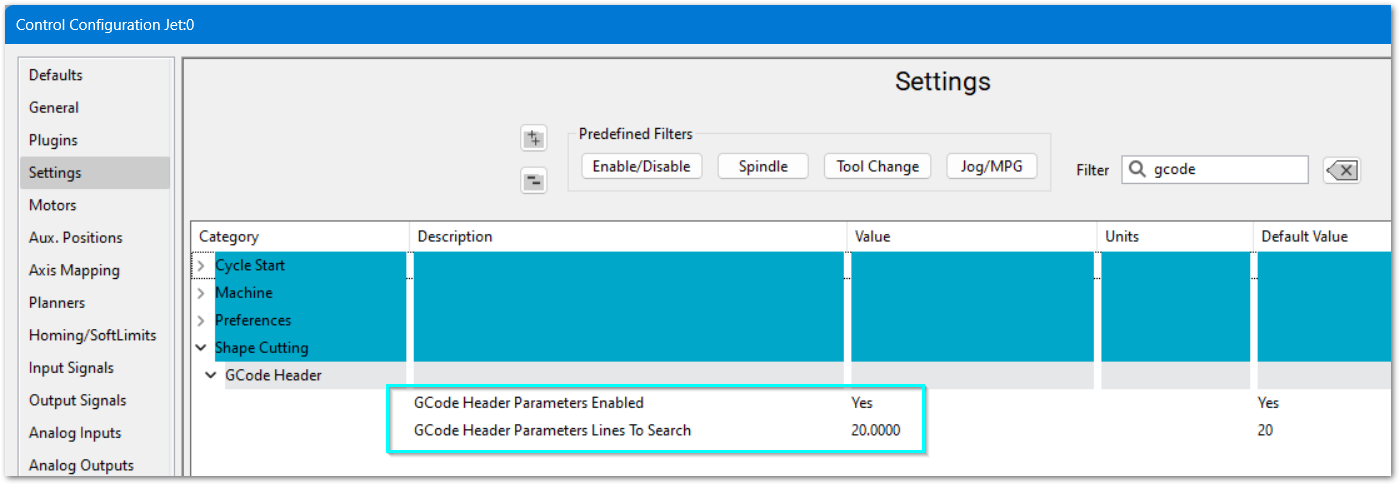
GCode Header Parameters Enabled
This parameter controls whether header parsing runs at all.
- Yes: enables GCode Header Parameter processing.
- Any other value: header parsing does not run.
GCode Header Parameters Lines To Search
This parameter sets how many lines from the top of the G-code file are scanned for supported options.
- Set this high enough to cover the normal header comments in your program files.
- If the parameter is missing, invalid, or less than 1, the scan defaults to 20 lines.
A common setup is to set GCodeHeaderParametersEnabled to Yes and set GCodeHeaderParametersLinesToSearch to 20 or 40, depending on the size of the file header.
Using The Feature
- Put the desired setup text near the top of the program, before normal cutting code begins.
- Use supported Plasma or Jet option names exactly as listed below, or use one of their accepted aliases.
- Keep the value on the same line as the option name.
- If the same option appears more than once in the scanned header, only the first valid value is used.
Plasma Header Options
The following header options are currently supported by the Plasma GUI module.
- Amperage: writes to HC_Amperage.
- Ignition Height: writes to HC_IgnitionHeight.
- Cut Height: writes to HC_CutHeight.
- Pierce Height: writes to HC_PierceHeight.
- Pierce Delay or Pierce Time: writes to HC_PierceDelay.
- Cut Speed or Feedrate: writes to HC_CutSpeed.
- Target Voltage or Voltage: writes to HC_TargetVoltage.
- Kerf Width or Kerf: writes to HC_KerfWidth.
- Material ID, ID, or Material: calls TechTables.ActivateMaterialByID(...).
For Plasma material selection, the value should be the actual Tech Table material ID, such as SS03. Values such as type and thickness are ignored so that descriptive text is not treated as a material ID.
(Amperage: 45)
(Pierce Height: 0.150)
(Pierce Delay: 0.4)
(Cut Height: 0.060)
(Cut Speed: 125.0)
(Target Voltage: 122)
(Kerf Width: 0.070)
(Material ID: SS03)
Jet Header Options
The following header options are currently supported by the Jet GUI module.
- Pierce Delay: writes to JetPierceDelay.
- Abrasive or Abrasive Rate: writes to JetAbrasiveAxisRate.
- Pierce Height: writes to JetsPierceHeight.
- Cut Height: writes to JetsCutHeight.
- Retract Height: writes to JetsRetractHeight.
- Pressure: writes to pound variable #9000.
(Pierce Delay: 0.25)
(Abrasive Rate: 0.80)
(Pierce Height: 0.100)
(Cut Height: 0.040)
(Retract Height: 0.500)
(Pressure: 55)
Notes And Limitations
- Only the first configured header lines are scanned. Values placed deeper in the file are ignored.
- Automatic filename-change processing skips files in the Subroutines\ path.
- Plasma material activation uses the Tech Table material ID, not a descriptive material name.
- The supported option list is machine-specific. Plasma and Jet do not use the same destination registers.