
Aligning Slave Axis Gantry - HiCON Mach4
To align the gantry, anthe master and slave axes need to home, then the slave needs to move by the offset movevalue canyou enter. There are two configurations that will work. Both the master and slave need to have the Home Switch box selected for both configurations.
- If you have homing switches on both the master and slave axis, then select the
Independent Master-Slave Homebox on both the master and slave motors. This tells the HiCON that each motor will home to its own switch.
 |
 |
The slave misalignment value on the master motor is ignored, but it is best to set it to 0 for clarity. |
The slave misalignment value on the slave should be |
- If you only have one home switch, on the master axis, then deselect the
Independent Master-Slave Homebox on both the master and slave motors. This tells the HiCON that both axes will use the same home switch. - Map the home switch for the slave
axisaxis.onceInhomingConfigurehas|beencontrolcompleted.|Forinputs find the input for the masteraxis,axis'thehome,IndependentandMaster-Slave Home check box in the HiCON plugin needs to be selected: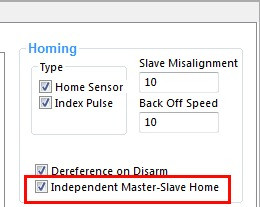
For the slave axis, the distance to move once homed to create the offset/alignment is set in the slave misalignment box:
*NOTE: for use with independent master-slave homing,map the slave axiswould typically have a home switch/sensor. However, it is not required. You can setto theslavesameaxisinput.homeswitch<insert graphic showing motor0 and motor1 mapped tobethe same inputasfor homing>


 |
 |
The slave misalignment value on the master |
The slave misalignment value on the slave should be set to the value you need to square the gantry. The units is the same as the motors use - either inches or mm. Both positive and negatives are valid. |
NOTES:
*NOTE:
- There is an issue in some versions where the slave misalignment amount gets rounded once the Mach software has been closed. Be sure to test carefully
andafter making youradjustment,adjustment.exitExit the mach software and restart and check the value to see if it has changed/rounded. If it does, there is an update for this. Please contact MachMotion for assistance. - The
speedBackthatOfftheSpeedslaveusesmisalignmentrapidcorrects itself is based off the "rapid" moveunits (the max velocity and acceleration of the axis).,The "Back Off Speed" valueand is thespeedsamethatunits as themachinemotorbacksvelocity.off
*NOTE: