
Yaskawa Absolute Encoders with Apollo III
Yaskawa Absolute Encoder feature allows the Apollo III to read the encoder position without the need for homing. When the CNC control software starts the software will read the encoder positions from the servo drives and update the internal positions from 0 to the actual motor positions.
Requirements:
- Apollo III Absolute Encoder license
- Buffer board part number X15-03-04 and version V1.02 or greater
- Digital Servo Adaptor board part number X15-02-09 and version 1.08 or greater with jumper installed on J5 and in the 2 and 3 position
- Motor Encoder cable with batter or battery adaptor JZSP-CSP12-E
- Standoff MPN number Hex6.35x17.46 and MM number 100536
Components:
Absolute Encoder License
Use the VSI Device Manager to confirm the Absolute Encoders feature is active

Buffer board X15-03-04
This board is used to send the SEN command to the Yaskawa servo drive through the Servo Adaptor Board. The board needs to be installed onto the Apollo III and a wire ran from the terminal labeled "1" on the green block to J1 pin "5" of the Servo Adaptor Board.

Digital Servo Adaptor board X15-02-09
This board is used to connect the Yaskawa drive to the Apollo III for commands and feedback. Confirm the version number on the board is at least V1.08 or it will not work with the Absolute Encoder interface.

Motor Encoder Cable with Battery JZSP-CSP12-E
Yaskawa servo motors need a battery on the encoder cable to use the Absolute Encoder feature. A new encoder cable can be purchased with the battery installed or a adaptor can be used like the one in the following photo.

Installation
Hardware Kit
- Buffer board part number X15-03-04
- Digital Servo Adaptor board part number X15-02-09 with jumper installed
- Motor Encoder cable with batter or battery adaptor JZSP-CSP12-E
- Standoff MPN number Hex6.35x17.46 and MM number 100536
Remove cover

Remove mounting screw

Install Standoff
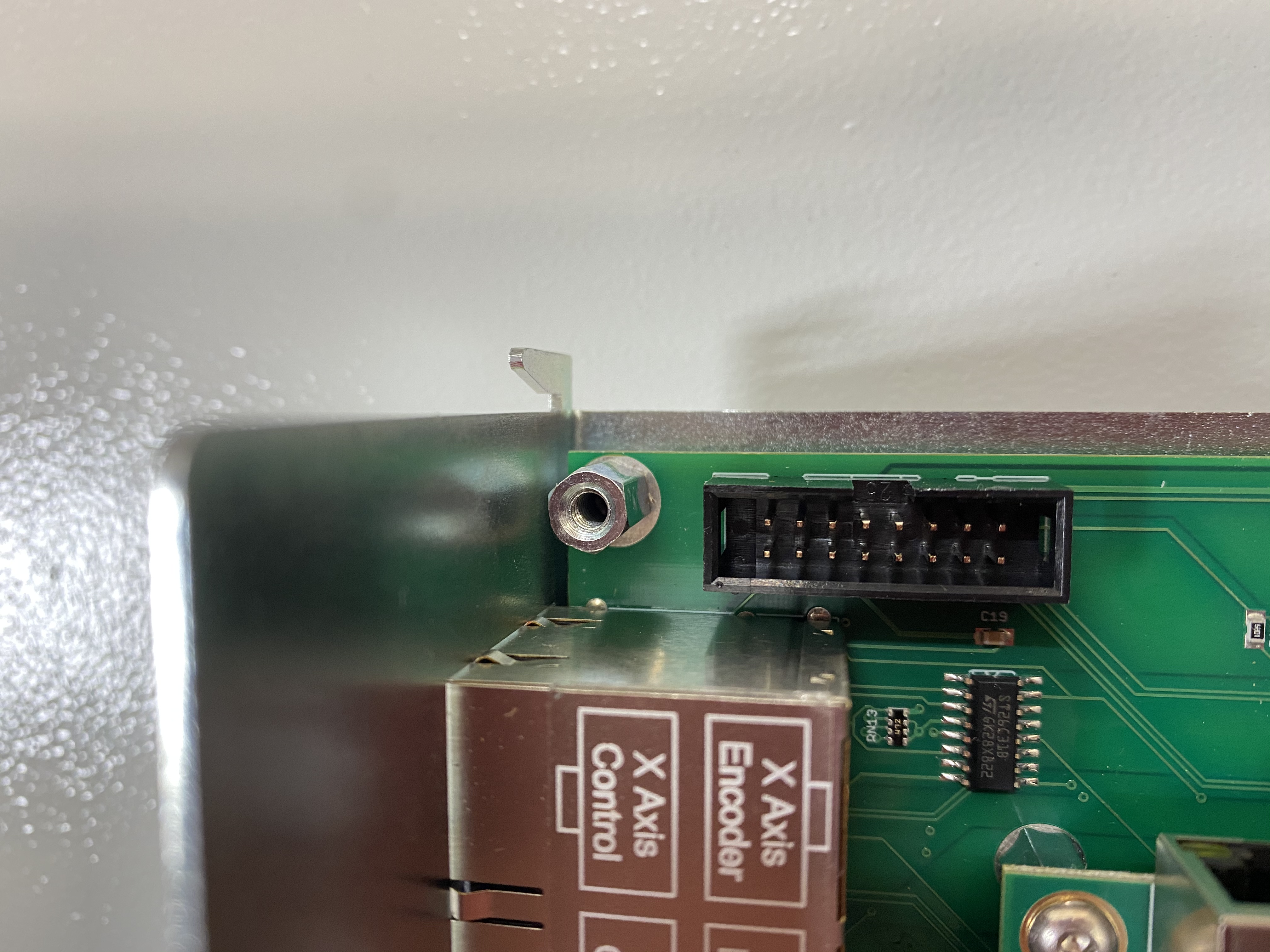
Install Buffer Board

Reinstall mounting screw

Install jumper on servo adaptor J5 pin 2-3 next to the labeled SEN

Install wire from Buffer Board to all Yaskawa servo adaptors for SEN signal

Install Motor Encoder Cable with Battery
Software and Parameters Setup
Yaskawa Servo Drive
Servo Drive Parameters:
We need Pn002.2 set to 0 (Factory setting). This will enable the SEN input to be used to send the encoder position to the motion controller.

Servo Drive Absolute Encoder Setup
The rotational data will be a value between -2 and +2 rotations when the absolute encoder setup is executed. The reference position of the machine system will change. Set the reference position of the host
controller to the position after setup.
If the machine is started without adjusting the position of the host controller, unexpected operation may
cause injury or damage to the machine. Take sufficient care when operating the machine.
Setting up the absolute encoder is necessary in the following cases:
- When starting the machine for the first time
- When an encoder backup error alarm (A.810) is generated
- When an encoder checksum error alarm (A.820) is generated
- When initializing the rotational serial data of the absolute encoder
Set up the absolute encoder with Fn008.
- Precautions on Setup
Set up the encoder when the servo ON signal (/S-ON) is OFF.
If the following absolute encoder alarms are displayed, cancel the alarm by using the same method as the set
up (initializing) with Fn008. They cannot be canceled with the SERVOPACK alarm reset input signal (/
ALM-RST).
Encoder backup error alarm (A.810)
Encoder checksum error alarm (A.820)
Any other alarms (A.8xx) that monitor the inside of the encoder should be canceled by turning OFF the
power. - Procedure for Setup
Follow the steps below to setup the absolute encoder.

Read Encoder Output Pulse Parameter
Read the number of encoder pulses per revolution in parameter Pn212. Now we need to multiply the encoder pulses by 4 to convert them to encoder counts.
Example:
Encoder Pulses - Pn212 = 4096
Encoder Counts - 16384 = 4096 * 4
Now we can enter the calculated value into the Control parameter "Encoder Counts Per Rev Motor x" under the Absolute Encoders section.
Software Setup
Navigate to the Control Parameters and enter Absolute Encoder into the filter box. To enable Absolute Encoders on the Control you need to change the following parameters:
- Absolute Encoders HiCON Enabled = Yes
Configure the following parameters for each motor that will use Absolute Encoders
- Absolute Encoders Enabled Motor xx = Yes
- Encoder Counts Per Rev Motor xx = Encoder Counts calculated in the section Read Encoder Output Pulse Parameter

Testing
Restart the CNC Control software and when the software loads it should read the encoder positions from the Servo Drives and mark each axis as Homed. When the Control software is disabled and you press "Reset" the control will update the encoder positions again.
Appendix
{{@1106}}