Trio Drive Setup
Programming
Download Motion Perfect (Motion Program Development System) from Trio's website (https://www.triomotion.com/system/downloadPage.php?location=%2Fsoftware) .
Install on your control.
Open the software.
Select the type of interface you're going to program with (standard is USB Mini on X1 port of the DX3 drives).
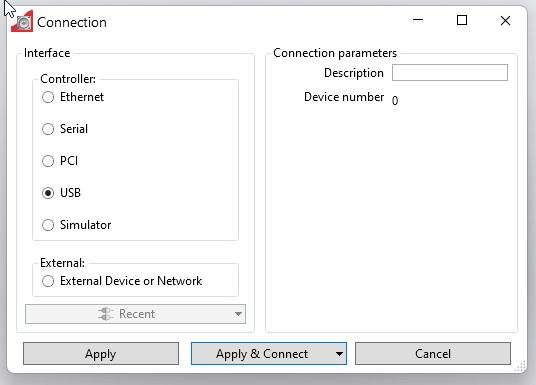
Press Apply & Connect.
Program with default parameters.
Main used parameters:
| Parameter | MachMotion Default | Notes |
| Pn007.1 |
1 |
Set to 0 for single phase.
|
| Pn002.2 |
0 |
0 [Default] Use the encoder as an absolute encoder (requires encoder battery) |
|
|
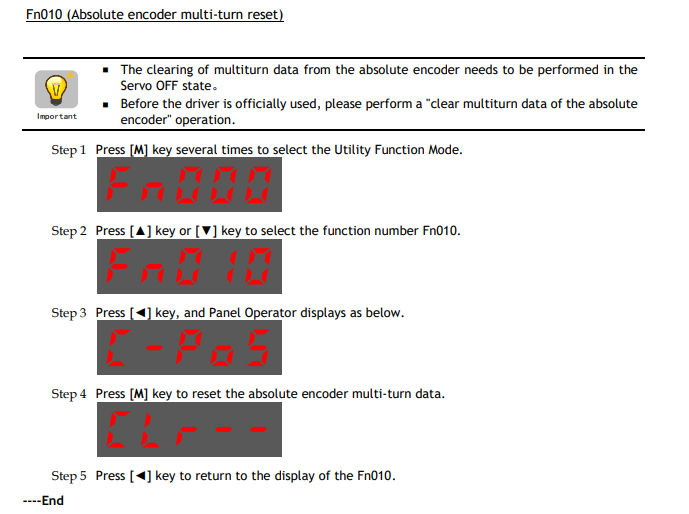
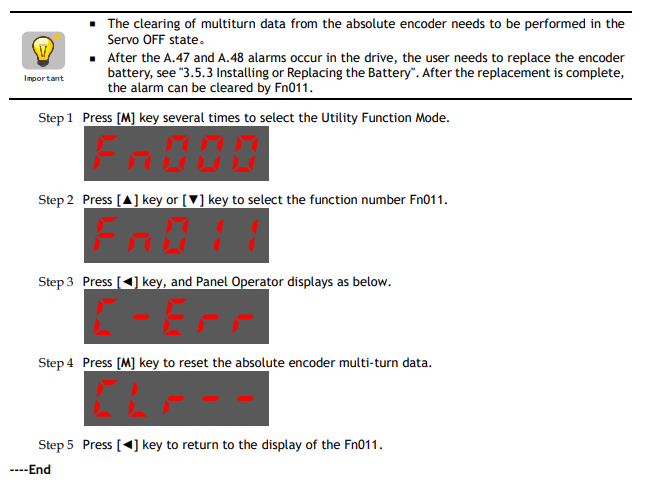
Reset Absolute Encoders
Follow the procedures below when powering up an absolute encoder system. A47 alarm or an A48 alarm will occur when the Drive is first powered up if absolute encoders are enabled.