Trio Drive Setup
Programming
Download Motion Perfect (Motion Program Development System) from Trio's website (https://www.triomotion.com/system/downloadPage.php?location=%2Fsoftware) .
Install on your control.
Open the software.
Select the type of interface you're going to program with (standard is USB Mini on X1 port of the DX3 drives).
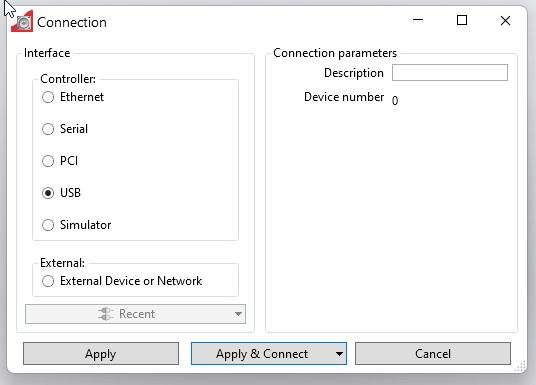
Press Apply & Connect.
Program with default parameters.
Main used parameters:
| Parameter | MachMotion Default | Notes |
| Pn007.1 |
1 |
Set to 0 for single phase.
|
| Pn002.2 |
0 |
0 [Default] Use the encoder as an absolute encoder (requires encoder battery) |
|
|
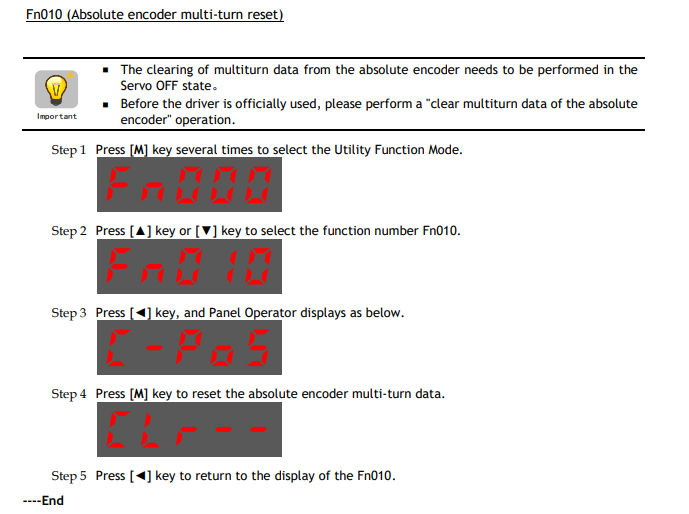
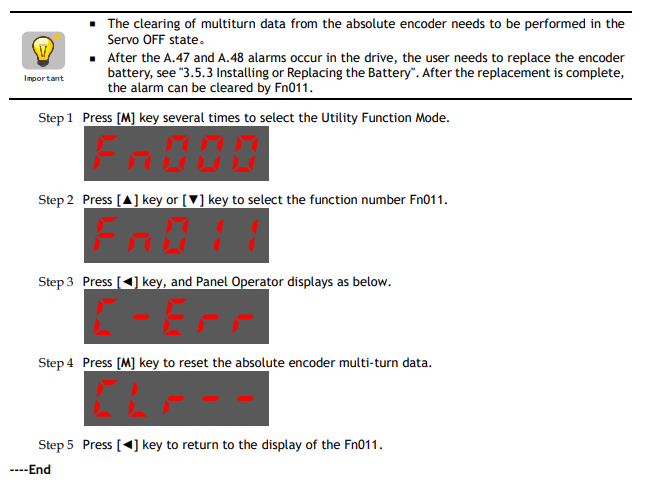
Reset Absolute Encoders
Follow the procedures below when powering up an absolute encoder system.