
Hitachi WJ200 Mini Manual
Hitachi WJ200
Alarm Codes:
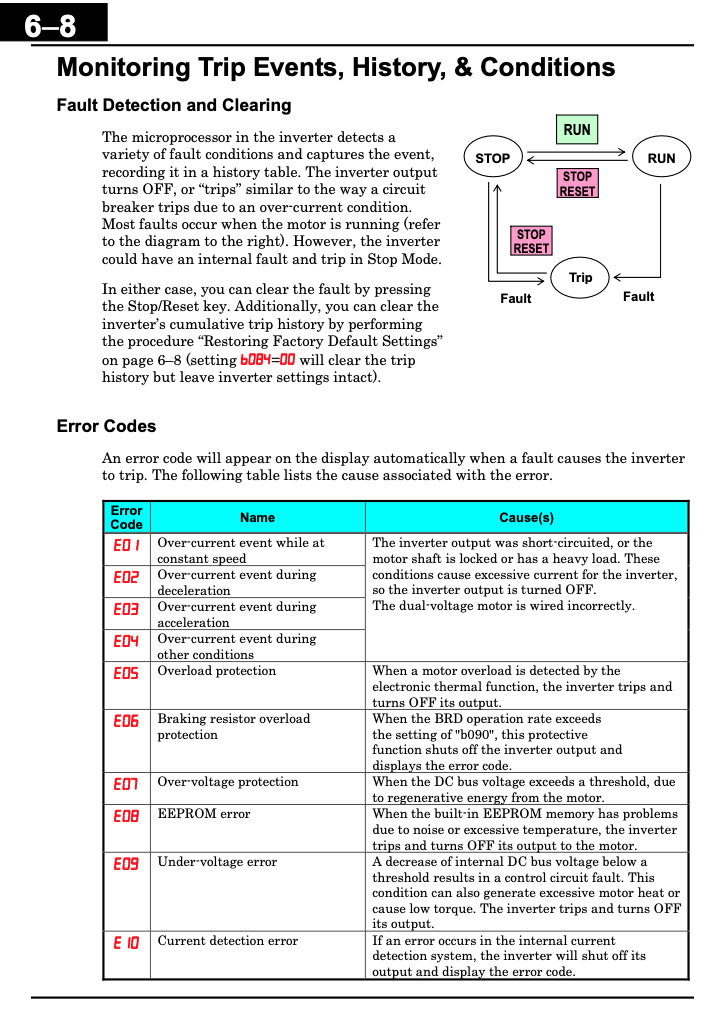


Programming
To be able to program the Hitachi VFD you will either need to change the parameters physically on the VFD or with the Hitachi ProDrive Next software.
- Software requirements: Mini USB Cable connected to the VFD and the computer that will be doing the programming.
-
NOTE: The programming software automatically changes A001 and A002 to run from the keypad. Make sure they are both set to 01 for the VFD to run based on the wired terminals.
Example parameters:

GoMech Parameter file attached.
|
Parameter |
Name |
Definition |
Default Value |
Units |
Change Value |
|
B037 |
Function code display |
Unlock All Parameters |
4 |
|
0 |
|
A001 |
Frequency Source |
Options for frequency command: Control = 1, ModBus = 3, Option card = 4, etc. |
2 |
Opt. |
1 |
|
A002 |
Run Command Source |
Options for run command source |
2 |
|
1 |
|
F002 |
Acceleration time (1) |
Standard default acceleration, range is 0.01 to 3600 sec. |
10 |
sec |
3 |
|
F003 |
Deceleration time (1) |
Standard default deceleration, range is 0.01 to 3600 sec. |
10 |
Sec |
3 |
|
A003 |
Base Frequency |
Settable from 30 Hz to the maximum frequency(A004) |
60 |
Hz |
300 |
|
A004 |
Maximum Frequency |
Settable from the base frequency to 400 Hz Settable from the 2nd base frequency to 400 Hz |
60 |
Hz |
300 |
|
A082 |
Motor Voltage |
200V class: 200 / 215 / 220 / 230 / 240 VAC |
200 |
volts |
220 |
|
b012 |
Level of electronic thermal |
Set a level between 20% and 100% for the rated inverter current. |
Rated Current |
A |
100% |
|
H004 |
Poles |
|
4 |
|
2 |
|
B083 |
Carrier frequency |
Sets the PWM carrier (internal switching frequency), range is 2.0 to 15.0 kHz |
2 |
kHz |
4 |
|
|
|
|
|
|

See attached manufacturers manual for more details.