
Hitachi WJ200 Mini Manual
Hitachi WJ200
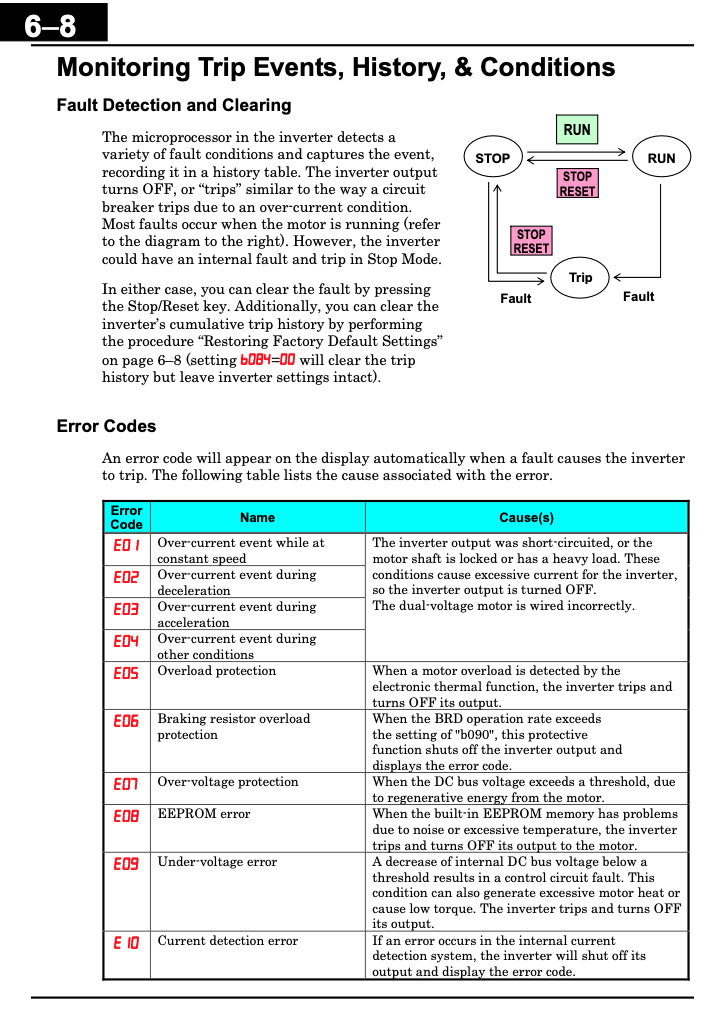
Alarm Codes:


Programming
To be able to program the Hitachi VFD you will either need to change the parameters physically on the VFD or with the Hitachi ProDrive Next software.
- Software requirements: Mini USB Cable connected to the VFD and the computer that will be doing the programming.
Example parameters:

|
Parameter |
Name |
Definition |
Default Value |
Units |
Change Value |
|
F001 |
Output frequency setting |
Standard default target frequency that determines constant motor speed, range is 0.0 / start frequency to maximum frequency (A004) |
0 |
Hz |
300 |
|
F002 |
Acceleration time (1) |
Standard default acceleration, range is 0.01 to 3600 sec. |
10 |
sec |
3 |
|
F003 |
Deceleration time (1) |
Standard default deceleration, range is 0.01 to 3600 sec. |
10 |
Sec |
3 |
|
A003 |
Base Frequency |
Settable from 30 Hz to the maximum frequency(A004) |
60 |
Hz |
300 |
|
A004 |
Maximum Frequency |
Settable from the base frequency to 400 Hz Settable from the 2nd base frequency to 400 Hz |
60 |
Hz |
300 |
|
b012 |
Level of electronic thermal |
Set a level between 20% and 100% for the rated inverter current. |
Rated Current |
A |
100% |
|
H004 |
Poles |
|
4 |
|
2 |

See attached manufacturers manual for more details.