
CTB Servo Drives

1. Introduction
MachMotion offers two series the GH single axis and MAS multi axis drives. The GH can be used as a single axis servo drive and can be connected to a range of PM motors or can be used to drive a AC induction spindle motor. The MAS come in to versions 3 and 4 axis.
The drives all use EtherCAT for communication from the drive and controller.
2. Wiring
GH Series
Wiring overview
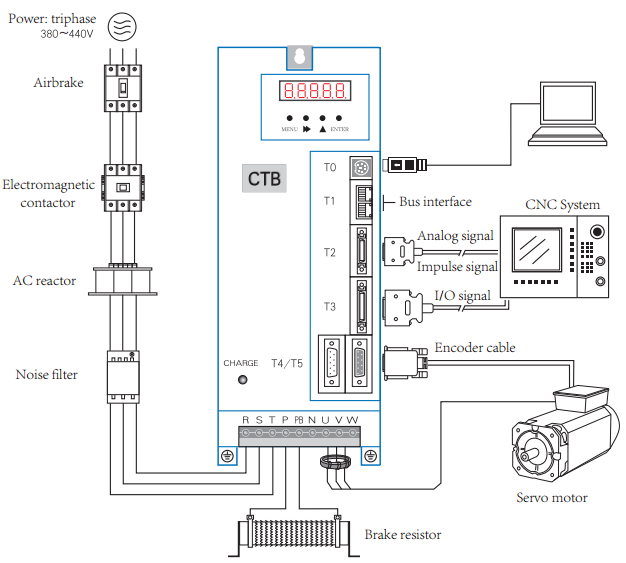
Wiring logic overview
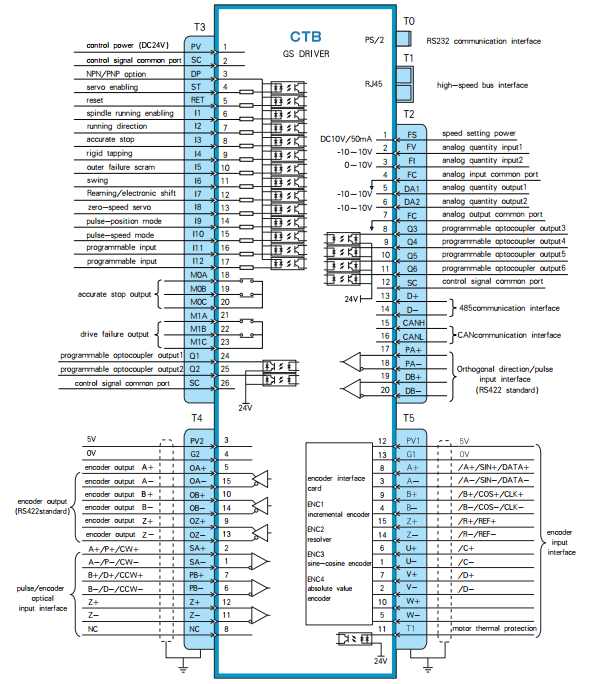
EtherCAT buss (Connectors T1 and T2)
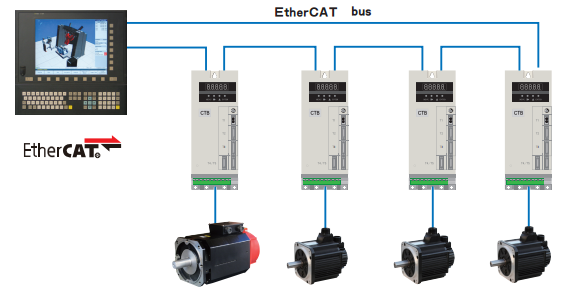
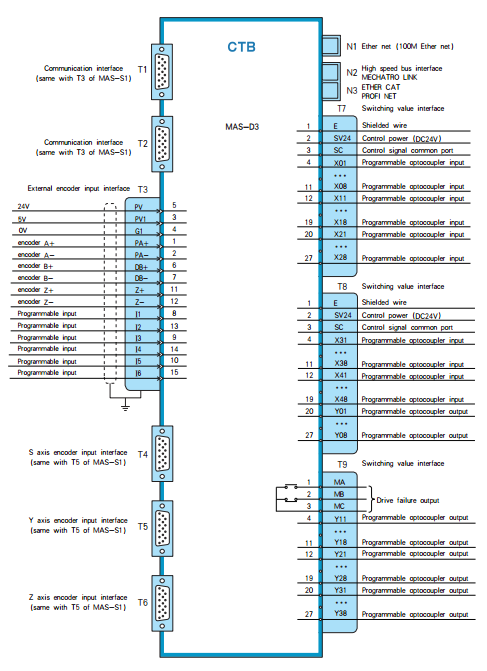
MAS Series Version D3
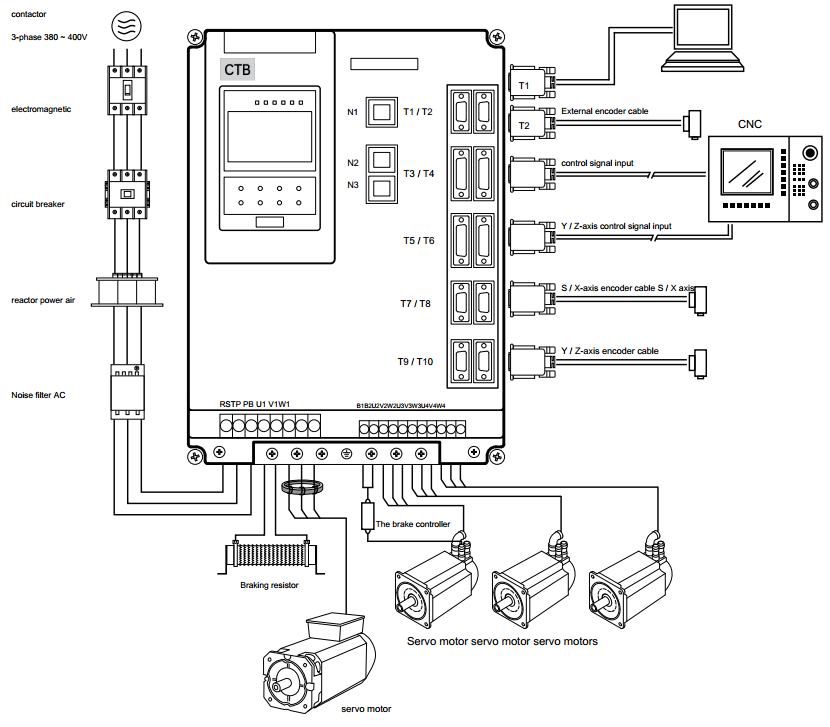
Spindle Setup
The CTB drives can be configured to use the encoder on that is built into the motor or a external load encoder for position feedback. The encoder on the motor should always be connected to the drive with connector T5. Every spindle drive is expected to have the correct braking resistor installed.
Spindle Configurations
- V belt spindle drive with external encoder connected to CNC control. The CNC control can monitor the encoder and control the drive in speed mode.
Supported Functions: Speed mode, threading.
- Synchronous belt transmission, the transmission ratio of 1:1, with zero position switch.
Supported Functions: Speed mode, spindle orientation, C axis positioning, threading, rigid tapping.
- Synchronous belt transmission, the transmission ratio of 1:1.
Supported Functions: Speed mode, spindle orientation, C axis positioning, threading, rigid tapping.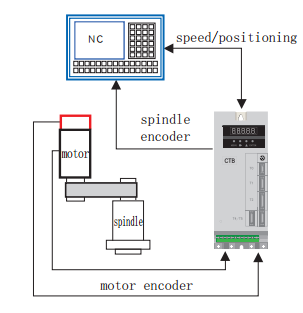
- Gear box with multiple transmission ratios, external encoder mounted 1:1 ratio to the spindle.
Supported Functions: Speed mode, spindle orientation, C axis positioning, threading, rigid tapping.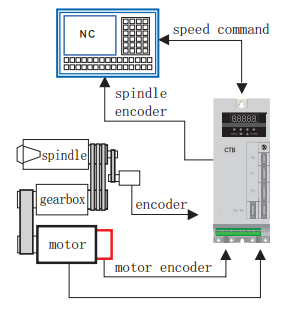
External Load Encoder
The external encoder must be a 5V TTL quadrature encoder with A,B and marker pulse to be used for orientation of the spindle. It is very important that the external encoder is mounted 1:1 ratio to the spindle load.
- Encoder wiring:
Function Cannon Plug DB15 Pin Number 0V K 4 5V H 3 A A 2 /A N 1 B C 7 /B R 6 Z B 12 /Z P 11 Shield Shell - Encoder parameters:
To use the external encoder set C1-03 = 1 and C1-04 = 2. To view the external encoder count on the drive look at U2-01.Parameter Name Descriptions Factory Setting C1-03 Position Feedback Source 0: Motor Encoder (T5)
1: External Encoder (T4)
0 C1-04 Position Operation Source 0: Invalid
1: Motor Encoder (T5)
2: External Encoder (T4)
1 E1-15 External Encoder Type (T4) 0: Invalid
1: Quadrature
1 E1-16 External Encoder Pules Count (T4) 0~16348 1024 E1-17 External Encoder Direction (T4) 0: Clockwise
1: Counterclockwise
0 E1-18
External Encoder Reduction Ratio Numerator (T4) 1~30000
1 E1-19
External Encoder Reduction Ratio Denominator (T4) 1~30000
1
Brake Resistor
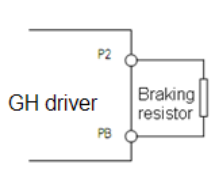
- Connection of braking resistor
The P, PB terminals on main circuit block of AC servo driver are for connection with braking resistor.
Please do not connect braking resistor to other terminals, otherwise, the braking resistor will heat up and
burn out, or cause damage to the driver.
Specification of braking resistor
BKSC-XXXX GHX 43
P745
P547
P540
1140
1540
1840
2240
3040
3740
4540
5540
7540
9041
1041
3241
6042
0042
50
43
15
Power
W60
080
010
0060
080
010
0010
0015
0020
0020
0025
0025
0025
0025
0020
0020
0025
0025
00
25
00
Resist
ance
Ω50 40 32 50 40 32 32 32 20 20 20 20 20 20 20 20 20 20 20 Qty. 1 1 1 2 2 2 2 2 2 2 2 3 3 3 4 4 6 6 8
- Parameters setting
Set the following parametersParameter Name Descriptions Factory Setting P1-01 Buss Over Voltage Alarm 0~10000
800
Firmware
Updating Firmware
- Power off the drive
- Switch the programmer switch on the back box towards the LED
- Power the drive on, the drive LED screen should be blank
- Download from this document the attached "STMicroelectronics flash loader.zip" and the "GH and MASD3 Firmware M_xxxxxx.zip"
from this document. - Unzip the downloaded files
- Open this programmer application (STMicroelectronics flash loader.exe)
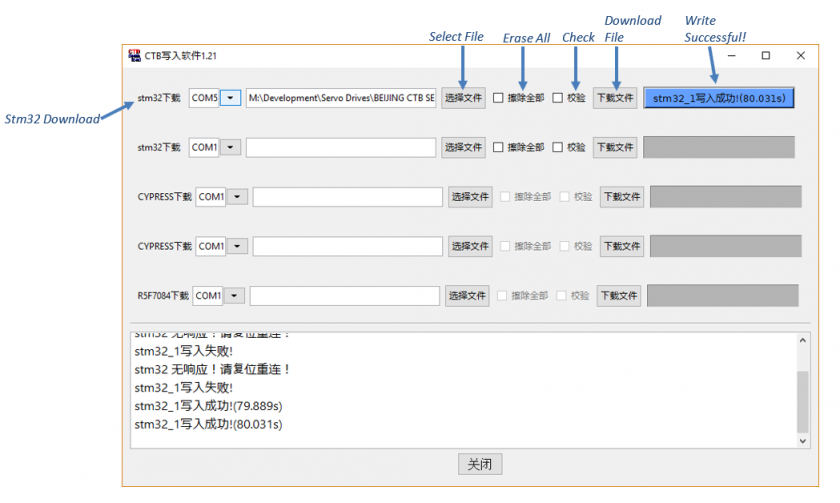
- Select the com port
- Look in the device manager for the USB-serial COM port.
- Navigate to the .hex file
- Press the button on the far right (“Download File”)
When updating buss board do the following
- Change the parameter C1-29 to 3
- Download firmware then cycle power
- Now change T1-06 to 4
Updating Device ESI (XML) Files
- Download from this document the attached "EtherCAT_Configurator.zip"
- Unzip and install the "EtherCAT Configurator.exe"
- Download from this document the attached "GH and MASD3 ESI XML Files.zip"
- Unzip the "GH and MASD3 ESI XML Files.zip" and copy the files to "C:\Program Files (x86)\EtherCAT Configurator\EtherCAT\"
- Connect the EtherCAT network CAT5 to the Machine Network port on the CNC control.
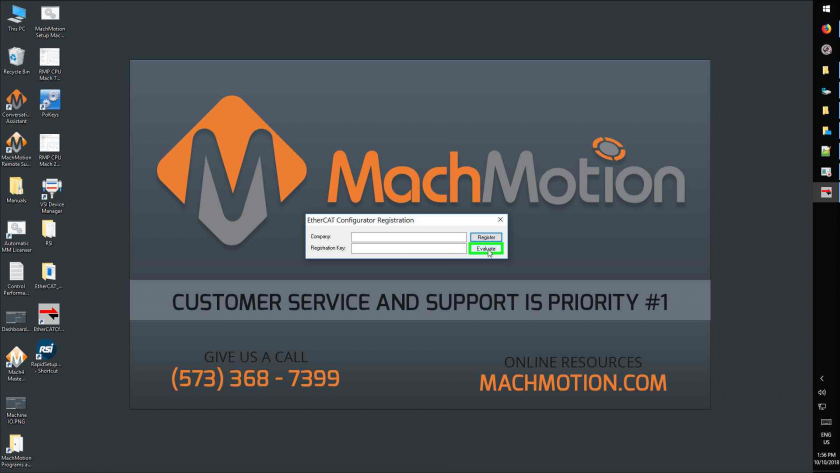
- Open the EtherCAT Configurator Program

-
Click on Evaluate
-
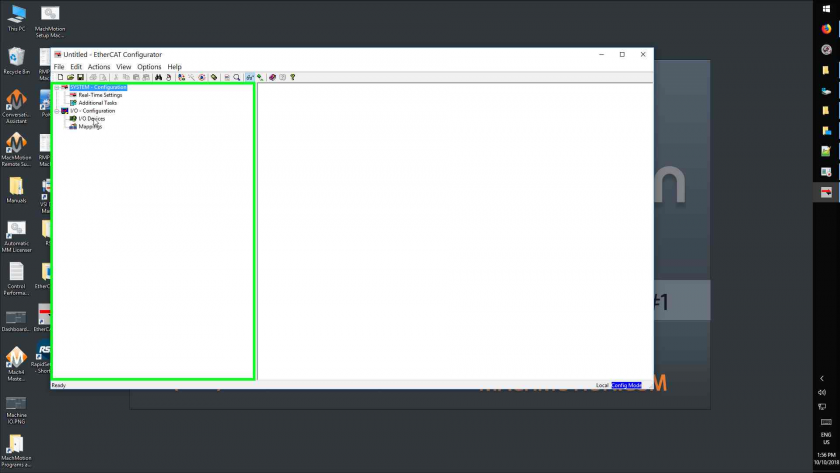
Click
-
Recorded Steps
This file contains all the steps and information that was recorded to help you describe the recorded steps to others.
Before sharing this file, you should verify the following:
- The steps below accurately describe the recording.
- There is no information below or on any screenshots that you do not want others to see.
Passwords or any other text you typed were not recorded, except for function and shortcut keys that you used.
You can do the following:
Steps
Step 1: (10/10/2018 1:56:08 PM) User left double click on "EtherCATCfg.exe (list item)"
Step 2: (10/10/2018 1:56:11 PM) User left click on "Evaluate (button)" in "EtherCAT Configurator Registration"
Step 3: (10/10/2018 1:56:13 PM) User left click on "I/O Devices (tree item)" in "Untitled - EtherCAT Configurator"
Step 4: (10/10/2018 1:56:14 PM) User right click on "I/O Devices (tree item)" in "Untitled - EtherCAT Configurator"
Step 5: (10/10/2018 1:56:16 PM) User left click on "Scan Devices... (menu item)"
Step 6: (10/10/2018 1:56:17 PM) User left click on "OK (button)" in "EtherCAT Configurator"
Step 7: (10/10/2018 1:56:18 PM) User left click on "Device 5 (EtherCAT) [Machine (Intel(R) I211 Gigabit Network Connection)] (check box)" in "5 new I/O devices found"
Step 8: (10/10/2018 1:56:21 PM) User left click on "OK (button)" in "5 new I/O devices found"
Step 9: (10/10/2018 1:56:23 PM) User left click on "Yes (button)" in "EtherCAT Configurator"
Step 10: (10/10/2018 1:56:28 PM) User left click on "Yes (button)" in "EtherCAT Configurator"
Step 11: (10/10/2018 1:56:29 PM) User left click on "Drive 1 (BEIJING CTB MAS-D3 AC SERVO DRIVER) (tree item)" in "Untitled - EtherCAT Configurator"
Step 12: (10/10/2018 1:56:32 PM) User left click on "EtherCAT (tab item)" in "Untitled - EtherCAT Configurator"
Step 13: (10/10/2018 1:56:35 PM) User left click on "Advanced Settings... (button)" in "Untitled - EtherCAT Configurator"
Step 14: (10/10/2018 1:56:37 PM) User left click on "ESC Access (tree item)" in "Advanced Settings"
Step 15: (10/10/2018 1:56:38 PM) User left click on "ESC Access (tree item)" in "Advanced Settings"
Step 16: (10/10/2018 1:56:39 PM) User left click on "E²PROM (tree item)" in "Advanced Settings"
Step 17: (10/10/2018 1:56:40 PM) User left click on "E²PROM (tree item)" in "Advanced Settings"
Step 18: (10/10/2018 1:56:41 PM) User left click on "Smart View (tree item)" in "Advanced Settings"
Step 19: (10/10/2018 1:56:43 PM) User left click on "Write E²PROM... (button)" in "Advanced Settings"
Step 20: (10/10/2018 1:56:45 PM) User left click on "BEIJING CTB MAS-D3 AC SERVO DRIVER (65542 / 65543) (tree item)" in "Write EEPROM"
Step 21: (10/10/2018 1:56:48 PM) User left click on "OK (button)" in "Write EEPROM"
Step 22: (10/10/2018 1:56:55 PM) User left click on "OK (button)" in "Advanced Settings"
Step 23: (10/10/2018 1:57:00 PM) User left click on "Close (button)" in "Untitled - EtherCAT Configurator"
Step 24: (10/10/2018 1:57:03 PM) User left click on "No (button)" in "EtherCAT Configurator"
Step 25: (10/10/2018 1:57:07 PM) User left click on "Steps Recorder - Recording Now - 1 running window (button)"
Additional Details
The following section contains the additional details that were recorded.
These details help accurately identify the programs and UI you used in this recording.
This section may contain text that is internal to programs that only very advanced users or programmers may understand.
Please review these details to ensure that they do not contain any information that you would not like others to see.
Recording Session: 10/10/2018 1:56:05 PM - 1:57:09 PM
Recorded Steps: 25, Missed Steps: 0, Other Errors: 0
Operating System: 14393.2363.amd64fre.rs1_release.180625-1741 10.0.0.0.2.125
Step 1: User left double click on "EtherCATCfg.exe (list item)"
Program: Windows Explorer, 10.0.14393.0 (rs1_release.160715-1616), Microsoft Corporation, EXPLORER.EXE, EXPLORER.EXE
UI Elements: EtherCATCfg.exe, SysListView32, SHELLDLL_DefView, WorkerW
Step 2: User left click on "Evaluate (button)" in "EtherCAT Configurator Registration"
Program: EtherCAT Configurator, 2, 11, 0, 2245, Beckhoff Automation GmbH, ETHERCATCFG.EXE, ETHERCATCFG.EXE
UI Elements: Evaluate, Button, EtherCAT Configurator Registration, #32770
Step 3: User left click on "I/O Devices (tree item)" in "Untitled - EtherCAT Configurator"
Program: EtherCAT Configurator, 2, 11, 0, 2245, Beckhoff Automation GmbH, ETHERCATCFG.EXE, ETHERCATCFG.EXE
UI Elements: I/O Devices, I/O - Configuration, SysTreeView32, AfxMDIFrame90, AfxMDIFrame90, Untitled - EtherCAT Configurator, Afx:00400000:b:00010003:00000006:00F804AD
Step 4: User right click on "I/O Devices (tree item)" in "Untitled - EtherCAT Configurator"
Program: EtherCAT Configurator, 2, 11, 0, 2245, Beckhoff Automation GmbH, ETHERCATCFG.EXE, ETHERCATCFG.EXE
UI Elements: I/O Devices, I/O - Configuration, SysTreeView32, AfxMDIFrame90, AfxMDIFrame90, Untitled - EtherCAT Configurator, Afx:00400000:b:00010003:00000006:00F804AD
Step 5: User left click on "Scan Devices... (menu item)"
Program: EtherCAT Configurator, 2, 11, 0, 2245, Beckhoff Automation GmbH, ETHERCATCFG.EXE, ETHERCATCFG.EXE
UI Elements: Scan Devices..., Context, #32768
Step 6: User left click on "OK (button)" in "EtherCAT Configurator"
Program: EtherCAT Configurator, 2, 11, 0, 2245, Beckhoff Automation GmbH, ETHERCATCFG.EXE, ETHERCATCFG.EXE
UI Elements: OK, Button, EtherCAT Configurator, #32770, Untitled - EtherCAT Configurator, Afx:00400000:b:00010003:00000006:00F804AD
Step 7: User left click on "Device 5 (EtherCAT) [Machine (Intel(R) I211 Gigabit Network Connection)] (check box)" in "5 new I/O devices found"
Program: EtherCAT Configurator, 2, 11, 0, 2245, Beckhoff Automation GmbH, ETHERCATCFG.EXE, ETHERCATCFG.EXE
UI Elements: Device 5 (EtherCAT) [Machine (Intel(R) I211 Gigabit Network Connection)], ListBox, 5 new I/O devices found, #32770, Untitled - EtherCAT Configurator, Afx:00400000:b:00010003:00000006:00F804AD
Step 8: User left click on "OK (button)" in "5 new I/O devices found"
Program: EtherCAT Configurator, 2, 11, 0, 2245, Beckhoff Automation GmbH, ETHERCATCFG.EXE, ETHERCATCFG.EXE
UI Elements: OK, Button, 5 new I/O devices found, #32770, Untitled - EtherCAT Configurator, Afx:00400000:b:00010003:00000006:00F804AD
Step 9: User left click on "Yes (button)" in "EtherCAT Configurator"
Program: EtherCAT Configurator, 2, 11, 0, 2245, Beckhoff Automation GmbH, ETHERCATCFG.EXE, ETHERCATCFG.EXE
UI Elements: Yes, Button, EtherCAT Configurator, #32770, Untitled - EtherCAT Configurator, Afx:00400000:b:00010003:00000006:00F804AD
Step 10: User left click on "Yes (button)" in "EtherCAT Configurator"
Program: EtherCAT Configurator, 2, 11, 0, 2245, Beckhoff Automation GmbH, ETHERCATCFG.EXE, ETHERCATCFG.EXE
UI Elements: Yes, Button, EtherCAT Configurator, #32770, Untitled - EtherCAT Configurator, Afx:00400000:b:00010003:00000006:00F804AD
Step 11: User left click on "Drive 1 (BEIJING CTB MAS-D3 AC SERVO DRIVER) (tree item)" in "Untitled - EtherCAT Configurator"
Program: EtherCAT Configurator, 2, 11, 0, 2245, Beckhoff Automation GmbH, ETHERCATCFG.EXE, ETHERCATCFG.EXE
UI Elements: Drive 1 (BEIJING CTB MAS-D3 AC SERVO DRIVER), Device 5 (EtherCAT), I/O Devices, I/O - Configuration, SysTreeView32, AfxMDIFrame90, AfxMDIFrame90, Untitled - EtherCAT Configurator, Afx:00400000:b:00010003:00000006:00F804AD
Step 12: User left click on "EtherCAT (tab item)" in "Untitled - EtherCAT Configurator"
Program: EtherCAT Configurator, 2, 11, 0, 2245, Beckhoff Automation GmbH, ETHERCATCFG.EXE, ETHERCATCFG.EXE
UI Elements: EtherCAT, SysTabControl32, #32770, AfxFrameOrView90, AfxMDIFrame90, AfxMDIFrame90, AfxMDIFrame90, Untitled - EtherCAT Configurator, Afx:00400000:b:00010003:00000006:00F804AD
Step 13: User left click on "Advanced Settings... (button)" in "Untitled - EtherCAT Configurator"
Program: EtherCAT Configurator, 2, 11, 0, 2245, Beckhoff Automation GmbH, ETHERCATCFG.EXE, ETHERCATCFG.EXE
UI Elements: Advanced Settings..., Button, EtherCAT, #32770, #32770, AfxFrameOrView90, AfxMDIFrame90, AfxMDIFrame90, AfxMDIFrame90, Untitled - EtherCAT Configurator, Afx:00400000:b:00010003:00000006:00F804AD
Step 14: User left click on "ESC Access (tree item)" in "Advanced Settings"
Program: EtherCAT Configurator, 2, 11, 0, 2245, Beckhoff Automation GmbH, ETHERCATCFG.EXE, ETHERCATCFG.EXE
UI Elements: ESC Access, SysTreeView32, Advanced Settings, #32770, Untitled - EtherCAT Configurator, Afx:00400000:b:00010003:00000006:00F804AD
Step 15: User left click on "ESC Access (tree item)" in "Advanced Settings"
Program: EtherCAT Configurator, 2, 11, 0, 2245, Beckhoff Automation GmbH, ETHERCATCFG.EXE, ETHERCATCFG.EXE
UI Elements: ESC Access, SysTreeView32, Advanced Settings, #32770, Untitled - EtherCAT Configurator, Afx:00400000:b:00010003:00000006:00F804AD
Step 16: User left click on "E²PROM (tree item)" in "Advanced Settings"
Program: EtherCAT Configurator, 2, 11, 0, 2245, Beckhoff Automation GmbH, ETHERCATCFG.EXE, ETHERCATCFG.EXE
UI Elements: E²PROM, ESC Access, SysTreeView32, Advanced Settings, #32770, Untitled - EtherCAT Configurator, Afx:00400000:b:00010003:00000006:00F804AD
Step 17: User left click on "E²PROM (tree item)" in "Advanced Settings"
Program: EtherCAT Configurator, 2, 11, 0, 2245, Beckhoff Automation GmbH, ETHERCATCFG.EXE, ETHERCATCFG.EXE
UI Elements: E²PROM, ESC Access, SysTreeView32, Advanced Settings, #32770, Untitled - EtherCAT Configurator, Afx:00400000:b:00010003:00000006:00F804AD
Step 18: User left click on "Smart View (tree item)" in "Advanced Settings"
Program: EtherCAT Configurator, 2, 11, 0, 2245, Beckhoff Automation GmbH, ETHERCATCFG.EXE, ETHERCATCFG.EXE
UI Elements: Smart View, E²PROM, ESC Access, SysTreeView32, Advanced Settings, #32770, Untitled - EtherCAT Configurator, Afx:00400000:b:00010003:00000006:00F804AD
Step 19: User left click on "Write E²PROM... (button)" in "Advanced Settings"
Program: EtherCAT Configurator, 2, 11, 0, 2245, Beckhoff Automation GmbH, ETHERCATCFG.EXE, ETHERCATCFG.EXE
UI Elements: Write E²PROM..., Button, ESC Access::E²PROM::Smart View, #32770, Advanced Settings, #32770, Untitled - EtherCAT Configurator, Afx:00400000:b:00010003:00000006:00F804AD
Step 20: User left click on "BEIJING CTB MAS-D3 AC SERVO DRIVER (65542 / 65543) (tree item)" in "Write EEPROM"
Program: EtherCAT Configurator, 2, 11, 0, 2245, Beckhoff Automation GmbH, ETHERCATCFG.EXE, ETHERCATCFG.EXE
UI Elements: BEIJING CTB MAS-D3 AC SERVO DRIVER (65542 / 65543), Drives, Beijing CTB technology CO., LTD., SysTreeView32, Write EEPROM, #32770, Advanced Settings, #32770, Untitled - EtherCAT Configurator, Afx:00400000:b:00010003:00000006:00F804AD
Step 21: User left click on "OK (button)" in "Write EEPROM"
Program: EtherCAT Configurator, 2, 11, 0, 2245, Beckhoff Automation GmbH, ETHERCATCFG.EXE, ETHERCATCFG.EXE
UI Elements: OK, Button, Write EEPROM, #32770, Advanced Settings, #32770, Untitled - EtherCAT Configurator, Afx:00400000:b:00010003:00000006:00F804AD
Step 22: User left click on "OK (button)" in "Advanced Settings"
Program: EtherCAT Configurator, 2, 11, 0, 2245, Beckhoff Automation GmbH, ETHERCATCFG.EXE, ETHERCATCFG.EXE
UI Elements: OK, Button, Advanced Settings, #32770, Untitled - EtherCAT Configurator, Afx:00400000:b:00010003:00000006:00F804AD
Step 23: User left click on "Close (button)" in "Untitled - EtherCAT Configurator"
Program: EtherCAT Configurator, 2, 11, 0, 2245, Beckhoff Automation GmbH, ETHERCATCFG.EXE, ETHERCATCFG.EXE
UI Elements: Close, Untitled - EtherCAT Configurator, Afx:00400000:b:00010003:00000006:00F804AD
Step 24: User left click on "No (button)" in "EtherCAT Configurator"
Program: EtherCAT Configurator, 2, 11, 0, 2245, Beckhoff Automation GmbH, ETHERCATCFG.EXE, ETHERCATCFG.EXE
UI Elements: No, Button, EtherCAT Configurator, #32770, Untitled - EtherCAT Configurator, Afx:00400000:b:00010003:00000006:00F804AD
Step 25: User left click on "Steps Recorder - Recording Now - 1 running window (button)"
Program: Windows Explorer, 10.0.14393.0 (rs1_release.160715-1616), Microsoft Corporation, EXPLORER.EXE, EXPLORER.EXE
UI Elements: Steps Recorder - Recording Now - 1 running window, Running applications, MSTaskListWClass, Running applications, MSTaskSwWClass, ReBarWindow32, Shell_TrayWnd


