Screen Modifications - Hiding an Axis DRO or Group in Mach
Activate your UseGUIModule by renaming it if it's not already there
C:\Mach4\Profiles\Mill\Macros\Scripts\UserGUIModule.mcs

Renamed

Open the UseGUIModule and make the following changes to the UserGUIModule.UserStartUpScriptFinalfunction.
If you don't have that script, add it in your user gui module by copying the code below:
The (mc.OB1_Axis) should be changed to the axis you want to hide. You're basically just un commenting the function and it's FunctionComplete stuff.
make sure to comment out any other stuff you're not using.

Save, and start Mach4
Hopefully that axis DRO isn't on there anymore.
Pro top: If you want to toggle showing that DRO on and off. The easiest thing seems to be to just rename the UseGUIModule to something else, and compile scripts. IF the UseGUIModule isn't doing anything else important I guess.
Hide Other Functions
Follow the same procedure except use the following API for different items. Regenerate scrips to test it.
m.HideGCodeDisplayAndToolPath()
m.screen.HideToolPathDisplay()
m.screen.HideSpindleWarmUpGroup()
m.screen.HideAllAxis()
m.screen.HideAllOBAxes()
m.screen.HideDwellBar()
h.SetObject("name", "Hidden", "1")
In place of "name" you can use the following groups.
For example, here is code to hide or unhide the ToolDisplayGroup:
h.SetObject("ToolDisplayGroup", "Hidden", "1") --Hide
h.SetObject("ToolDisplayGroup", "Hidden", "0")--UnHide
Here is a complete example of the code added to the UserGUIModule to hide these groups:
ToolDisplayGroup

ModalsGroup

FeedRateSliderGroup

SpindleSliderGroup

AdvancedSmallGroup

FileGroup

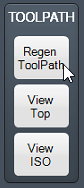
ToolPathGroup
TopStatusBar

Moving Groups
h.SetObject("SpindleSliderGroup", "Top", 630)
Add a Dashboard
Create a New Folder in the Dashboards folder.
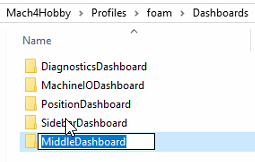
Restart Mach.
Add a Plugin Panel

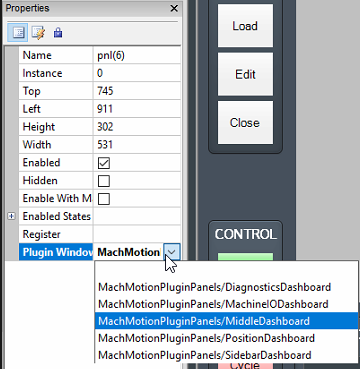
Add the Plugin Window: