
Baserow Explanation

It may be helpful to have Baserow open to follow along. For getting to Baserow: Accessing Baserow
1. Table Overview
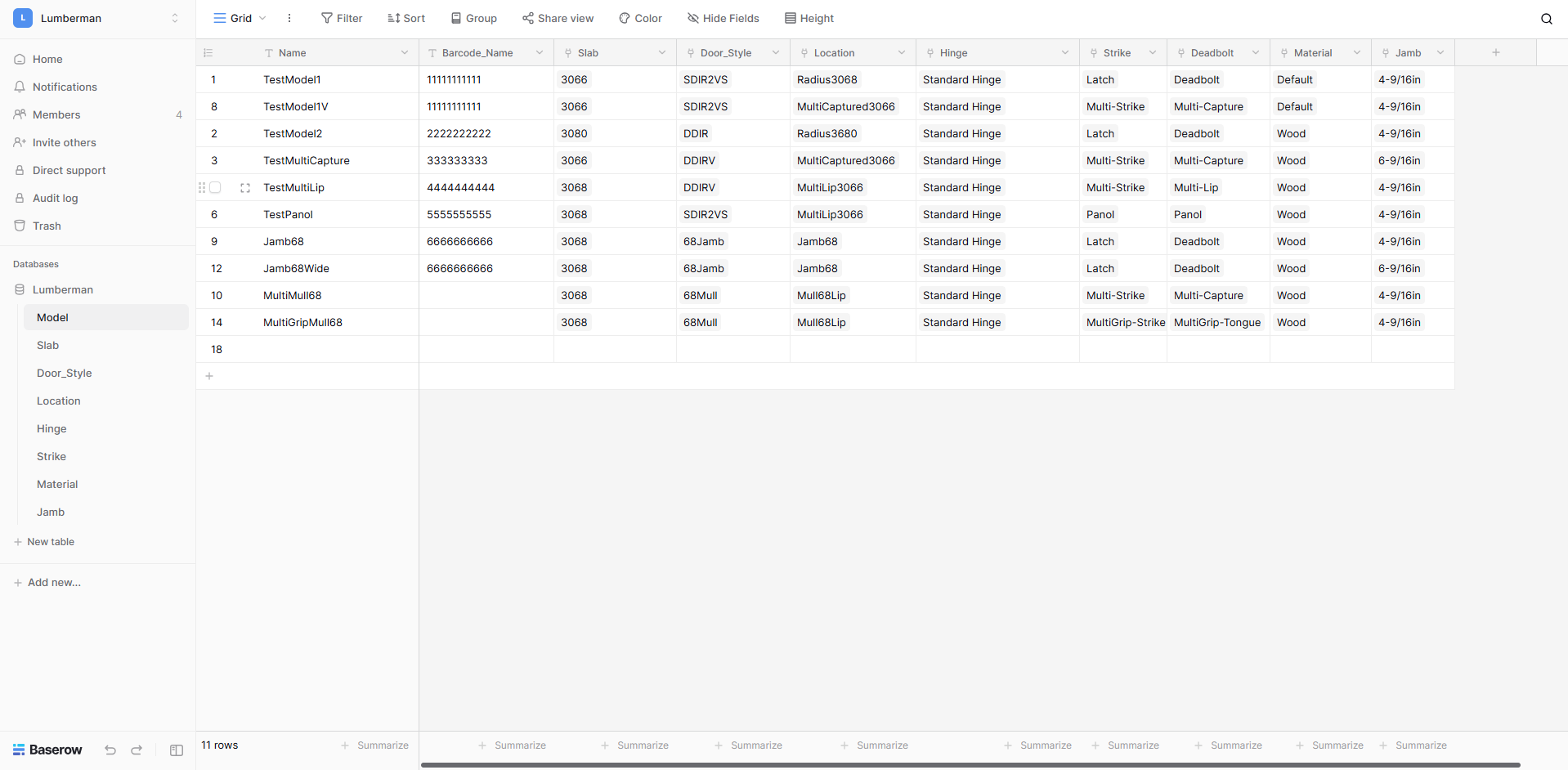
Model
This is where user created door models live. They are viewed/edited/created here. This tables uses the data found in the other tables for a simple model creating process. An explanation for how to make a model can be found here: Creating A Model in Baserow
Slab
Describes door slabs using height and width.
Door_Style
Describes orientation of a door.
Location
Data on where to place hinges/strikes, how many hinges and hinge thickness.
Hinge
Data used to describe a hinge to the gcode creating software.
Strike
Data used to describe a strike to the gcode creating software.
Material
Feed rate data for cutting each type of material.
Jamb
Data used to describe a jamb to the gcode creating software.
2. Table Explanations
In-depth look into the different tables. Describing what each of their columns do.
2.1 Model
Name
Unique identifier for a door model.
Barcode_Name
Optional name for a door model that can be turned into a barcode. This name should follow standard barcode conventions.
Slab
Which slab to use for a model. Lets you pick from created slabs in Slab.
Door_Style
Which Door_Style to use for a model. Lets you pick from created styles in Door_Style.
Location
Which location set to use for a model. Let's you pick from created location sets in Location.
Hinge
Which hinge to use for a model. Let's you pick from created hinges in Hinge.
Strike
Which strike to use for a model. Let's you pick from created strikes in Strike.
Deadbolt
Which deadbolt to use for a model. Let's you pick from created strikes in Deadbolt.
Material
Which material to use for a model. Let's you pick from created materials in Material.
Jamb
Which jamb to use for a model. Let's you pick from created Jambs in Jamb.
2.2 Slab
Slab - The blank piece of wood from which the door is cut out of
Name
Unique identifier for a slab.
Nominal_Width
"Pretty" representation of the slabs actual width
Nominal_Height
"Pretty" representation of the slabs actual height
Actual_Width
Actual width of slab
Actual_Height
Actual height of slab
Jamb_Height
Actual height of jamb
Jamb_Width
Actual width of jamb
Mull_Height
Actual height of mull
Header_Width
Actual width of header
2.3 Door_Style
Name
Unique identifier for a Door_Style.
Door_Type
Option selector for the door type.
Single - Single Door
Double - Double Door
Patio- Patio Door
Swing
Option selector for the door swing.
Inswing - Door swings in
Outswing - Door swings out
Handedness
Option selector for the handedness of the door.
RIght - Door swings in
Left - Door swings out
FL - Fixed/Left
LF - Left/Fixed
FR - Fixed/Right
RF - Right/Fixed
FFL - Fixed/Fixed/Left
FLF - Fixed/Left/Fixed
LFF - Left/Fixed/Fixed
FFR - Fixed/Fixed/Right
FRF - Fixed/Right/Fixed
RFF - Right/Fixed/Fixed
2.4 Location
Name
Unique identifier for a location set.
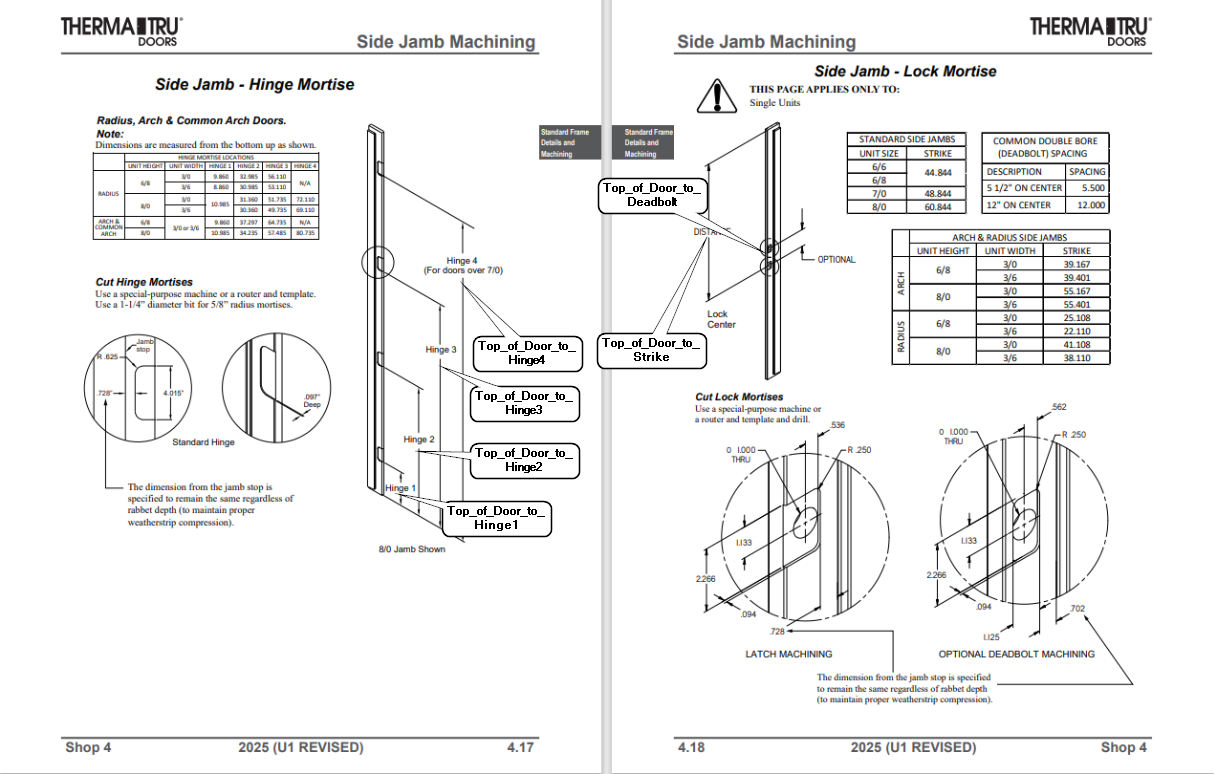
Top_of_Door_to_Hinge_1
Distance from the top of the door to the top of the first hinge
Top_of_Door_To_Hinge_2
Distance from the top of the door to the top of the second hinge
Top_of_Door_To_Hinge_3
Distance from the top of the door to the top of the third hinge
Top_of_Door_To_Hinge_4
Distance from the top of the door to the top of the fourth hinge
Top_of_Door_To_Strike_Center
Distance from the top of the door to the middle of the strike
Top_of_Door_To_Deadbolt_Center
Distance from the top of the door to the middle of the deadbolt
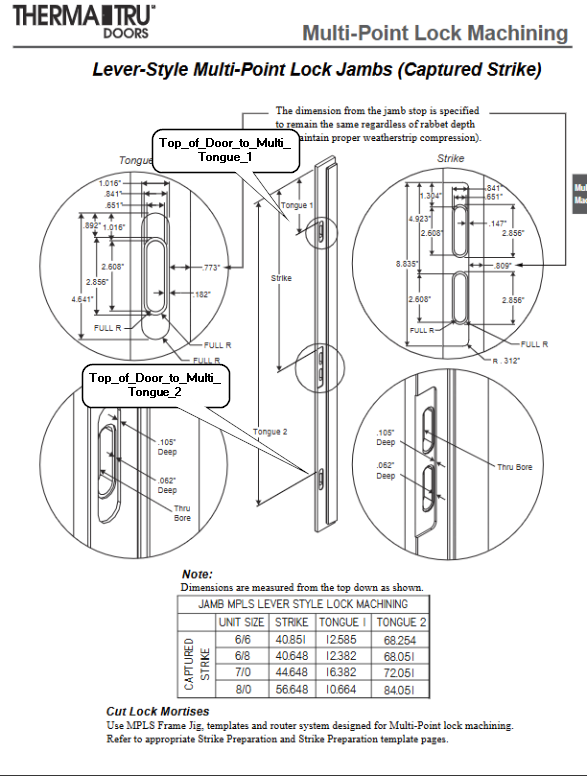
Top_of_Door_to_Multi_Tongue_1
Distance from the top of the door to the middle of the multi point tongue 1
Top_of_Door_to_Multi_Tongue_2
Distance from the top of the door to the middle of the multi point tongue 2
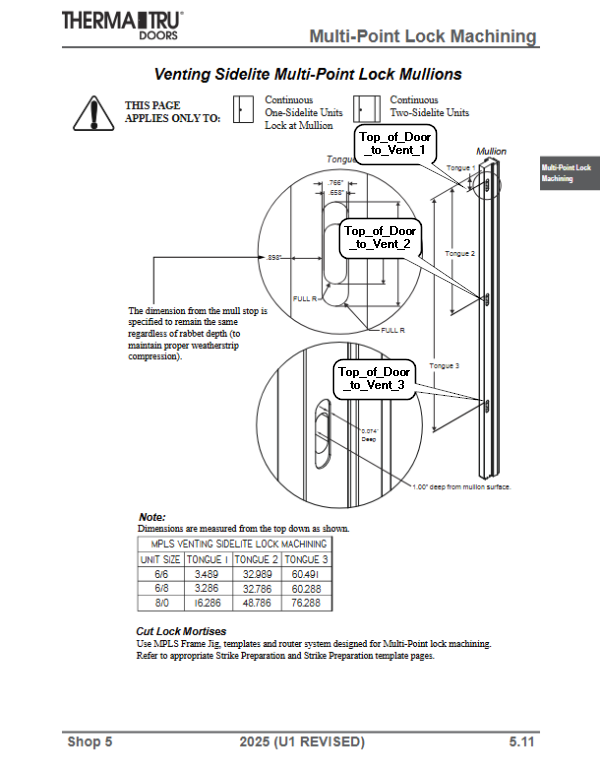
Top_of_Door_to_Vent_1
Distance from the top of the door to the middle of vent 1
Top_of_Door_to_Vent_2
Distance from the top of the door to the middle of vent 2
Top_of_Door_to_Vent_3
Distance from the top of the door to the middle of vent 3
Jamb_Shift
(Not currently used)
Mull_Left
Distance from the left edge of the mull post to the center of the left mull slot
Mull_Right
Distance from the right edge of the mull post to the center of the right mull slot
Mull_Spread
Extra distance in between the two mull slots
Mull_Vent
Distance from the edge to the center of the mull vent slot
2.5 Hinge
Notes:
- X and Y origin is the center of the drawing
- # refers to any given drill or hole column number. EX: Drill_#_X(Drill _1_X, Drill_2_X, Drill_3_X, Drill_4_X)
Name
Unique identifier for a hinge model
GCode
If a gcode file is inserted here, that gcode will be used to cut the hinge instead of using the hinge data found in Hinge table.
Width
Width of hinge (Distance across in Hinge Y-Axis). See image.
Height
Height of hinge (Distance across in Hinge X-Axis). See image.
Corner_Radius
If [Corner_Radius] is 0 then hinge corners are 90°. Otherwise, creates rounded corners with a radius of [Corner_Radius].
Hinge_Depth
How far hinge is cut into jamb in the Z direction.
Hinge_Backset
Offset from jamb backstop to edge of hinge.
Drawing
An image file can be saved here for an easy visual reference for a hinge.
Face
An options select for which side of the door the hinge will be cut on. This should always be "Right" for hinges.
Clearance
An easy way to add "slop" to a hinge. If [Clearance] is 0, hinge will be cut exactly to size specified. If [Clearance] > 0, height and width of hinge will be larger by [Clearance].
Subroutine
If [Subroutine] is any value other than -1, [Subroutine] will be called as a subroutine in gcode to cut hinge instead of using data found in Hinge.
Drill_Type
Option selector for which type of drill command to use. Should always be "99" unless it is known a different drill type should be used.
73 - High Speed Peck
81 - Straight Drilling
83 - Peck Drilling
99 - Retract Drilling
Drill_#_X
X location of # drill inside of hinge. See image
Drill_#_Y
Y location of # drill inside of hinge. See image
Drill_Depth
Distance drill will plunge into door.
Drill_Retract
Distance drill will retract out of material. 0 would be flush with side of door.
Drill_Peck
Distance drill will "Peck" into material if using peck drilling.
Drill_Dia
When Drill_Dia is blank all drills for hinge will be drilled. Otherwise, all drills for a hinge will be bored out with a diameter of [Drill_Dia].
Bore_X#
X location of bore # inside of hinge. See image
Bore_Y#
Y location of bore # inside of hinge. See image
Bore_Depth#
Depth of bore # inside of hinge.
Bore_Dia#
Diameter of bore # inside of hinge. See image
Bore_Step_Down
Distance bore will descend into door during each full revolution of bore.

2.6 Strike
Notes:
- X and Y origin is the center of the drawing
- # refers to any given drill or hole column. EX: Drill_#_X(Drill _1_X, Drill_2_X, Drill_3_X, Drill_4_X)
Name
Unique identifier for a lock model.
GCode
If a gcode file is inserted here, that gcode will be used to cut the lock instead of using the lock data found in Lock table.
Drawing
An image file can be saved here for an easy visual reference for a lock.
Face
An options select for which side of the door the lock will be cut on. This should always be "Front" for locks.
Clearance
An easy way to add "slop" to a lock. If [Clearance] is 0, lock will be cut exactly to size specified. If [Clearance] > 0, height and width of lock will be larger by [Clearance].
Subroutine
If [Subroutine] is any value other than -1, [Subroutine] will be called as a subroutine in gcode to cut lock instead of using data found in Lock.
Face_Height
Height of strike (Distance across in Strike Y-Axis). See image.
Face_Width
Width of strike (Distance across in Strike X-Axis). See image.
Face_Corner_Radius
If [Face_Corner_Radius] is 0 then strike corners are 90°. Otherwise, creates rounded corners with a radius of [Face_Corner_Radius].
Face_Depth
How far strike is cut into the jamb in the Z direction.
Face_Overcut
Tells the gcode software to cut an overhang when cutting a strike.
Strike_Backset
Offset from jamb backstop to edge of strike.
Hole_X#
X location of hole # inside of lock. See image
Hole_Y#
Y location of hole # inside of lock. See image
Hole_Dia#
If [Hole_Dia#] isn't empty, # hole will be bored with a diameter of [Hole_Dia#]. See image.
Hole_Depth#
Distance hole is cut into door.
Bore_Step_Down
Distance bore will descend into door during each full revolution of bore.
Pocket_Width#
Width of pocket (Distance across in pocket X-Axis).
Pocket_Height#
Height of pocket (Distance across in pocket Y-Axis).
Pocket_Corner_Radius#
If [Pocket_Corner_Radius] is 0 then pocket corners are 90°. Otherwise, creates rounded corners with a radius of [Pocket_Corner_Radius].
Pocket_Width_Depth#
How far pocket is cut into the jamb in the Z direction.
Pocket_Step_Down
Distance pocket will descend into door during each full revolution of pocket.

2.7 Material
Material - What the slab is made out of
Name
Unique identifier for a material.
Feed
Decimal between 0-1 representing a percent factor on the feed rate when cutting. Ex: .75 = 75
Plunge_Feed
Decimal between 0-1 representing a percent factor on the feed rate when plunging. Ex: .75 = 75
Lock_Feed
Decimal between 0-1 representing a percent factor on the feed rate when cutting the lock. Ex: .75 = 75
Lock_Plunge_Feed
Decimal between 0-1 representing a percent factor on the feed rate when plunging the lock. Ex: .75 = 75
Thickness
Thickness of material
Cut_Spindle_Speed
Decimal between 0-1 representing a percent factor on the spindle speed. Ex: .75 = 75
2.8 Jamb
Name
Unique identifier for a Jamb.
Jamb_Depth_Actual
Depth of jamb.
Mull_Depth_Actual
Depth of mull.
Jamb_Rabbet_Actual
Depth of jamb rabbet.
MULL_Rabbet_Actual
Depth of mull rabbet.