
MachPro Waterjet Setup Manual
{{@2007#bkmrk--1}}
Jet Setup
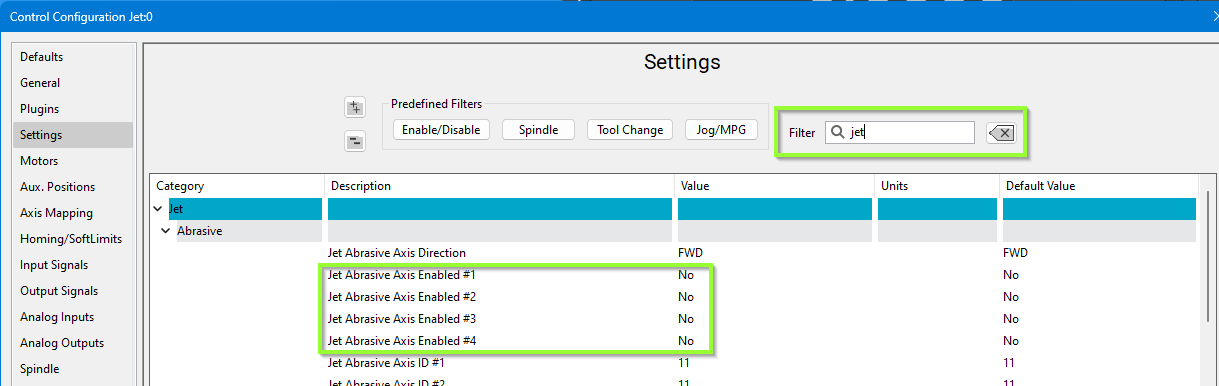
Configure the number of jets you need and your default delays. Pull down Configure -> Control - Settings.
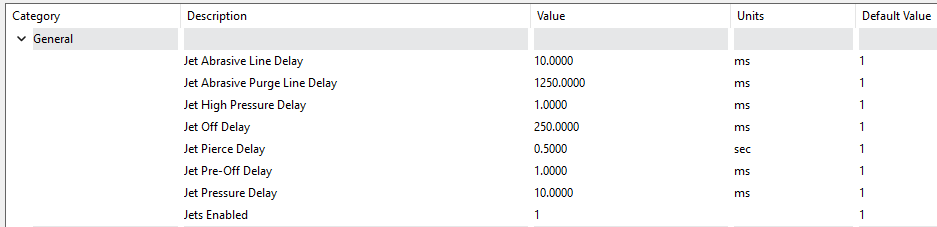
You may try setting the Jet Abrasive Purge Line Delay at 1250 ms which allows the abrasive to stop flowing just before the water turns off. Also set the Jet Off Delay to 250 ms which gives us a slight pause after the water turns off and before it starts moving to the next cut.
IO Setup
Virtually every waterjet will need some of following signals. Map each of the ones you need to the correct output.
| Name | Function | Configuration |
| Jet Abrasive Output(s) | Turns on and off abrasive for the corresponding jet. | Map it to the correct output signal in MachPro. |
| Jet High Pressure Output(s) | Turns on and off high pressure for the corresponding jet. Also called things like UHP On/On valve. | Map it to the correct output signal in MachPro. |
| Jet Pressure Output(s) | Turns on and off the actual jet. Often called Water On or Jet On. | Map it to the correct output signal in MachPro. |
| Jet Pump Output | This turns on the actual intensifier pump. If using a PLC this should trigger the PLC to start the intensifier. Often called Intensifier. | Map it to the correct output signal in MachPro. |
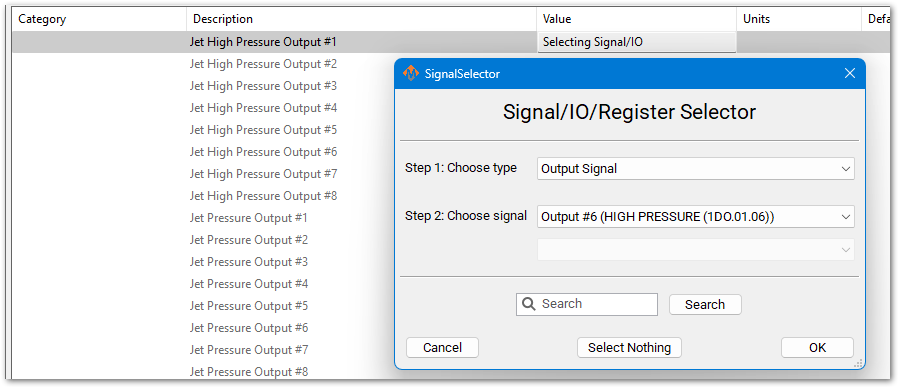
For example, Jet Pressure Output #1 here is set to Output #6, which is an EtherCAT digital output.
Some waterjets may have some of these more advanced IO. This is more for when the intensifier is controlled inside the MachPro PLC.
The main sequence to power on the intensifier is as follows:
- Turn on water (Filtered water shutoff valve). This allows water to go to the intensifier.
- Turn on the Bleeddown Valve to prepare the intensifier to run.
- Turn on Boost / Water Inlet Motor. This brings the incoming water up to a low PSI (like 50PSI)
- Wait until INLET WATER PRESSURE SHUTDOWN is active so we know the water pressure is above the base PSI. Often 3-5 seconds to build pressure.
- Turn on the intensifier. Turn on Cooling Water Shutoff valve to keep the water cold.
To turn off the intensifier, the following sequence is used:
- Turn off Intensifier and Cooling Water Shutoff.
- Turn on Bleeddown Valve to let the pressure out of the lines.
- Turn off the boost motor and the water.
Outputs
| ||
| ||
Inputs
| ||
| ||
| ||
| ||
| ||
| ||
| ||
| ||
| ||
|
For example, afor HYDRAULIC OIL OVERTEMPOVERTEMP. WARNINGConfigure a GMS wouldto bemonitor setupthis signal as follows:

Some waterjets have a servo controlled Abrasive. For that use these settings:

Analog Inputs and Outputs
You may have analog inputs and outputs used for setting pressure or garnet speed. Often you put them on the main screen of the waterjet. Configure them according to the device you are using (Siemens PLC Setup, or Rapidpath Beckhoff Setup).


PLC Setup
If the intensifier is controlled by the PLC, then you need to program the PLC.
Before programming the PLC, make sure to test all the machine IO in MachPro. That allows you to easily confirm the IO is working. Then program the PLC with our default PLC program for waterjets. It is located under development SVN: C:\Mach4_Development\PLCs\PLC-Program-Generic-Waterjet-Intensifier-Pump-Control_V15 .
Now you need to remove the outputs in MachPro so only the PLC can write to them. Open the Modbus window and delete the outputs that can only be controlled by the PLC:

For example, remove intensifier left solenoid and right solenoid that are mapped to Q0.0 and Q0.1 by clicking on output and then selecting Remove a Modbus Function button.


Some waterjets may need some slight modifications. You can make them here.
You may also have to invert the input proxies for the intensifier. You can do that by changing the inputs to NC as shown here by double clicking on the contact and selecting the NC option in the drop down.

You may also have to invert the Inlet Water Pressure Shutdown.

Testing PLC Intensifier
You can monitor the PLC and make sure that the intensifier is cycling back and forth.
You can also create a trace. Select add New Trace.

Setup a trace like this by adding the intensifier strokes and proxies:

Then select the record button.

Here is an example of a system not working correctly. Notice the inputs don't trigger on and off.

Here is another example of it not working correctly:

Pump Not Working
Try running water through the jet. You should be able to get water by doing the following:
- Activate Filter Water Shutoff Valve.
- Activate Boost Pump.
- Activate Jet On.
Cut Recovery
You can configure the axes to move.


{{@2016}}