
MachPro Mill and Router Setup Manual
{{@2007#bkmrk--1}}
MachPro 26 CNC Software Roadmap
Introduction
PleaseSome refer to the Motion Controllers documentation to:
Establish the connection between the motion controller and the MachPro computerConnect and configure drives
Work with your motion controller documentation and the appropriate MachPro Motion Controller Integration Documentation forof the following steps:
MachPro StartupAxis setupAxis calibrationMapping input signals (see default mapped inputs and outputs table below)Homing setupHoming slave axis - if presentTroubleshooting
Soft Limits setupMapping output signalsUsing outputsSpindle setup
Some of these configuration steps needare integrationintegrated with the MachPro software. The M31 Motion Control Setup Manual includes the information you need for the M31. Compatible motion controllers should complete the MachPro Compatible Motion Controller Configuration Settings
Please refer to the Motion Controllers documentation and the appropriate MachPro Motion Controller Integration Documentation for the following steps:
- Use a shielded network cable to connect the motion controller and the MachPro computer
- Connect the cables between the motion controller and the drives
- MachPro Startup and license install
- Axis setup
- Axis calibration
- Mapping input signals (see default mapped inputs and outputs table below)
- Homing setup
- Homing slave axis - if present
- Troubleshooting
- Soft Limits setup
- Mapping output signals
- Using outputs
- Spindle Setup
Languages
{{@2205}}
Spindle Calibration
This is primarily for mills where the speeds and feeds are precise, and directly affect the finish and accuracy of the final part. Spindle speeds on routers are usually not as precise.
Spindle Settings
{{@2047}}
Global Monitoring System (GMS)
{{@2002}}
Lube System Setup
{{@2046}}
Modifying GoTo Positions
{{@2045}}
Tool Setters and Offsets
{{@1995}}
Probing Wizard
{{@2206}}
Blum Probing Modules
{{@2203}}
Tool Changers
{{@1999}}
{{@1998}}
Drill Bank Setup and Operation
Other Machine Settings
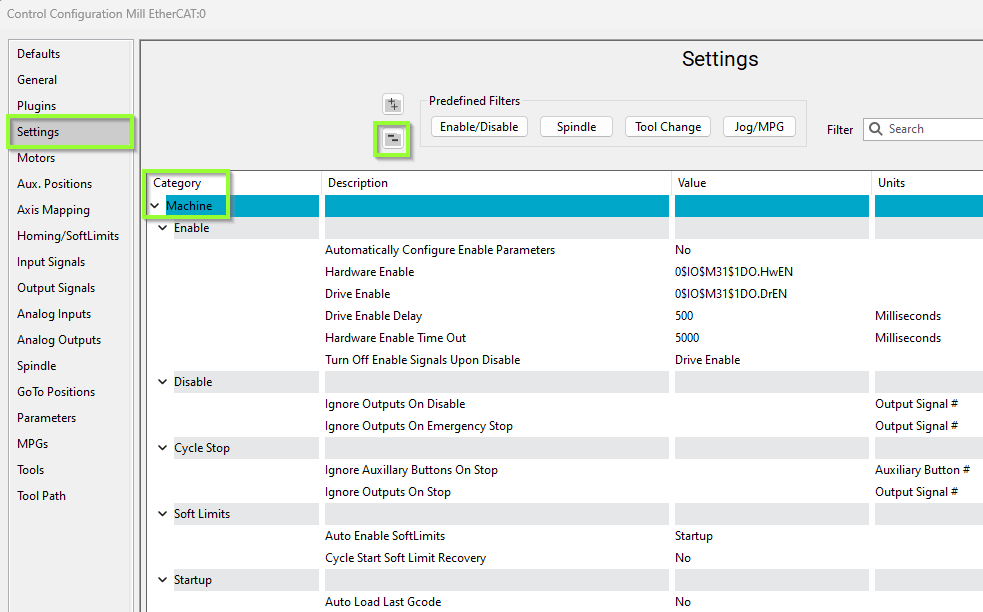
Pull down Configure -> Control and select the Settings Tab and scroll down to the Machine section
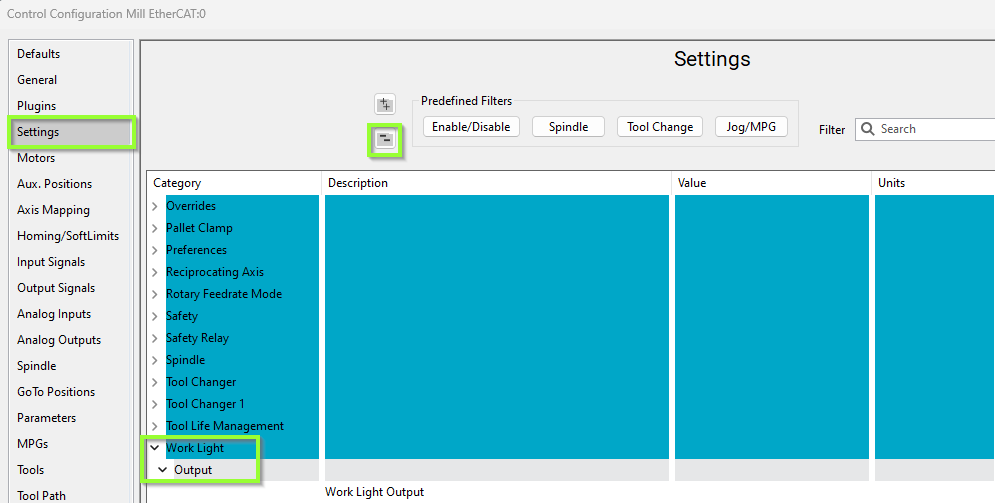
Work Light Output
Pull down Configure -> Control and select the Settings Tab and scroll down to the Work Light section
Additional Information
For information about MachPro Software Operation please see the MachPro Mill/Router Operating Manual
{{@2016}}