
MachPro Lathe Setup Manual

Introduction
Configure your motion controller including: axis calibration, homing, limits, and I/O
Lathe settings
These are the settings for the most commonly used Lathe features.
- Pull down Configure -> Control -> Settings tab
- Click the
 button to flatten the full settings tree, then expand the Spindle section


Gear shifter
Before configuring the gear shifter, you need to configure your gear ranges. Use this portion of the Spindle Calibration document for gear range configuration. Set MaxRPM values for each gear
The default settings will work for a lathe with a manual gear shifter.
You may use M-codes to run the gear change cycle during a job. M40 - M45 change ranges from 0 to 5. M40 P# can also be used where # is the gear range to use
Load
Connect your encoder to an analog input and map the Spindle Load Meter Register to that input
Orient
MachPro uses M19 to run the orient sequence.
The two primary ways to use it are in Manual or Automatic mode
For Manual mode, the default configuration will work without any changes

For Automatic mode configure:
- Spindle Orient Type Auto
- Spindle Orient Style Macro
- Spindle Orient Output
- Spindle Orient Input
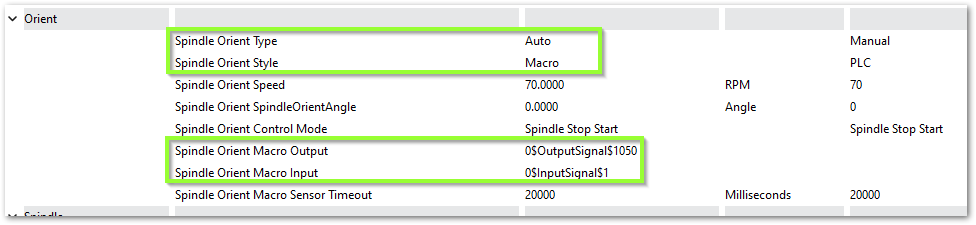
You may change the other parameters according to what your system needs.
Sub Spindle
The minimum settings that need to be configured for the subspindle are:
- Sub Spindle Enabled
- Sub Spindle CW output
- Sub Spindle CCW output
- Sub Spindle Max RPM

Use M-codes to control the sub spindle
- M013 CW start
- M104 CCW start
- M105 stop
A spindle warm up cycle is important for all CNC machines, and especially important for machines that are not in a temperature controlled building.
- The cycle lubricates spindle bearings.
- It stabilizes spindle and machine temperature.
- It reduces thermal expansion changes during startup.
- It helps maintain machining accuracy.
- It reduces premature bearing wear.
To configure a warm up cycle go to Configure ->Control->Settings tab.
- Collapse all of the settings with the
 button
 - Expand the Spindle section and scroll down to the Warm Up portion

Below are the default settings for the Spindle Warm Up.
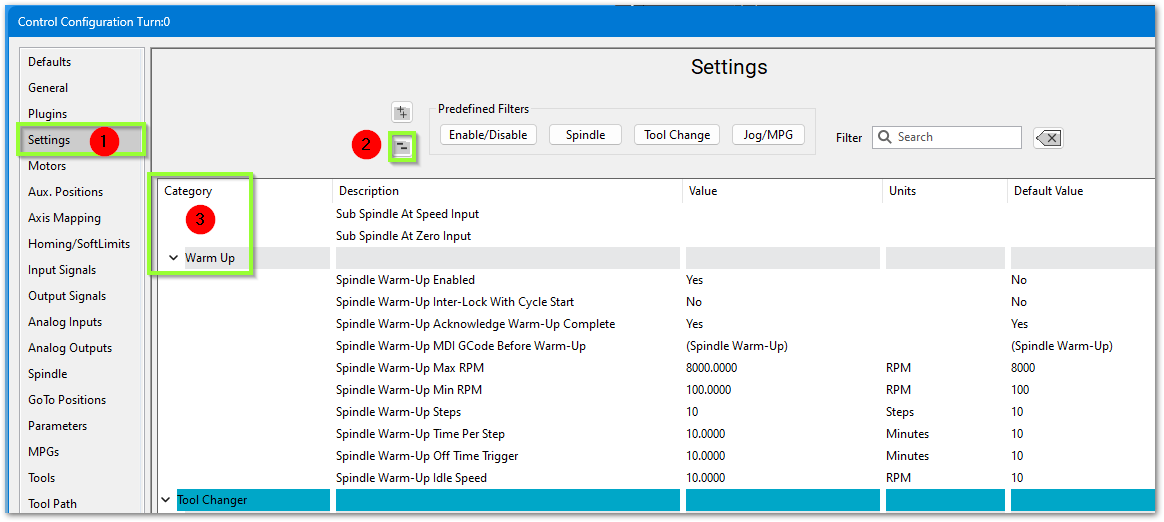
| Parameter | Description |
| Spindle Warm Up Enabled | Warm Up Cycle On or Off |
| Spindle Warm Up Inter-Lock with Cycle Start | Yes or No |
| Spindle Warm UP Acknowledge Warm-Up Complete | The operator will need to acknowledge that the warm up cycle completed |
| Spindle Warm Up MDI GCode Before Warm UP | Provides an MDI field to enter GCode that will run before the Warm Up cycle begins |
| Spindle War Up Max RPM | Max (finishing) speed for the warm up cycle. This should be the Max RPM of the spindle |
| Spindle Warm Up Min RPM | Minimum (starting) speed for the warm up cycle (see note below). Set this to 1 |
| Spindle Warm Up Steps | How many steps will it take to get the spindle up to Warmed Up status - from Minimum to Maximum RPM |
| Spindle Warm Up Time Per Step | How long it will stay in each Spindle Warm Up Step |
| Spindle Warm Up Off Time Trigger in minutes |
How long do want the spindle to be off before the spindle will need to run the Warm Up cycle |
| Spindle Warm Up Idle Speed | Speed the spindle will idle at after the warm up is complete. Some spindles will not idle below 1500 RPM |
Example:
- Locate the manufacturer's warm up instructions. If you do not have those instructions, then set 2 minutes at each step, 3 steps, ending 1 step below max spindle RPM.
- For the Spindle Warm Up Min RPM, enter 1. It will start at the correct RPM and run each step and time as you specified.
- High speed spindle example: max warm up RPM of 18000, 3 steps, 2 minutes at each step (18000/3 = 6000)
- Standard Spindle example: Max warm up RPM of 2000, 3 steps, 2 minutes at each step (2000/3 = 667)
| Setting | High Speed Spindle | Standard Spindle |
| Max RPM | 18000 | 2000 |
| Min RPM | 1 | 1 |
| Steps | 3 | 3 |
| Time per step |
2 | 2 |
| system actions |
2 min at 6000 2 min at 12000 2 min at 18000 run at the spindle warm-up idle speed |
2 min at 667 2 min at 1333 2 min at 2000 run at the spindle warm-up idle speed |
Lube System Setup
| http://www.mach-labs.com | MachLabs Documentation | support@mach-labs.com |
The MachLabs Team
14518 County Road 7240, Newburg, MO 65550
support@mach-labs.com