Altair 300

{{@2007#bkmrk--1}}

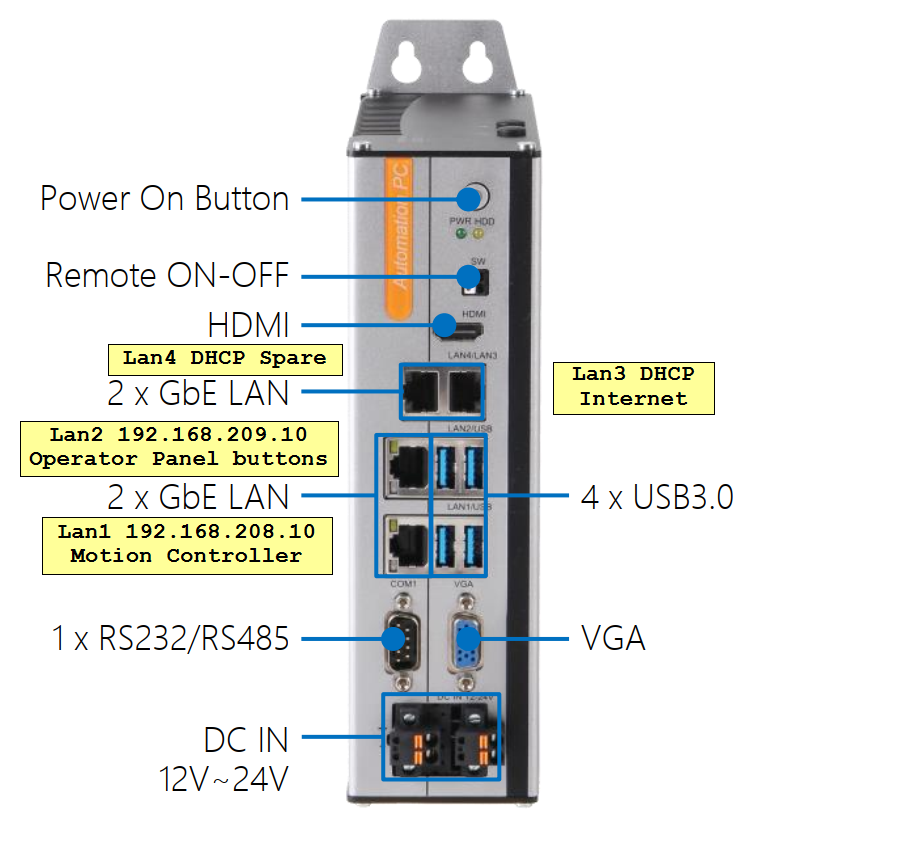
The Altair 300 is an industrial PC designed for use in a control cabinet. The full manufacturer's specifications are attached in the upper left cornerportion of this screen. Basic specifications:

  • Intel Core i5 with 16GB of memory and a 256GB SSD hard drive
  • 12-24VDC power, 120W max consumption
  • Windows 10 installed and licensed

These are the steps to connect your Altair 300 for use.

  1. Connect 12 - 24VDC to one of the two sets of DC terminals at the bottom of the computer. The second set are for backup or redundant power supply.
  2. Follow the + and - signs by the terminals. 
  3. Connect your video cable. Use either HDMI or VGA.
  4. Connect your keyboard and mouse using the USB ports.
  5. Connect your motion controller to LAN1
  6. Connect your internet to LAN3.
  7. Press the power button to power up and test your connections. 


image.png


{{@2016}}