Microsoft apps not working (paint, ms store, notepad ect.)

Use these methods if Microsoft apps stop working (paint, ms store, notepad, clipchamp, ect.) 


  1. Log in on a trusted account. 

  2. Repair/reset apps 

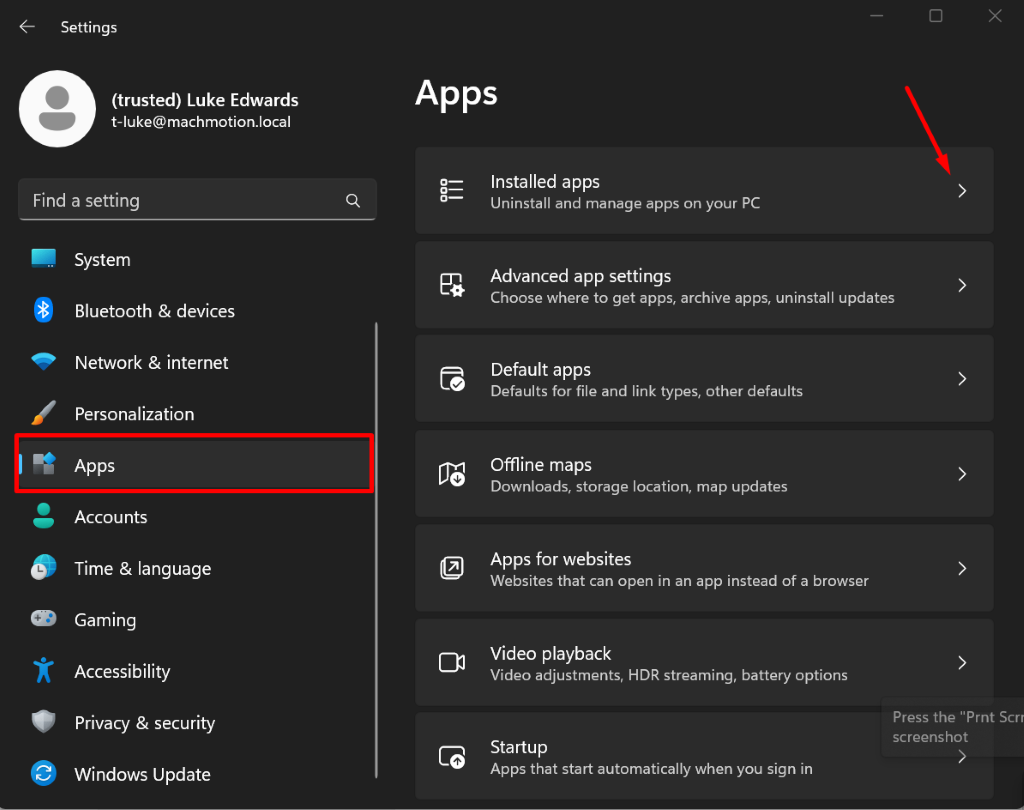
    1. Open settings and go to Apps > Installed Apps 

  3. Settings 
X 
(trusted) Luke Edwards 
Apps 
t-luke@machmotion.local 
Find a setting 
Installed apps 
DOO 
Uninstall and manage apps on your PC 
System 
Advanced app settings 
Bluetooth & devices 
Choose where to get apps, archive apps, uninstall updates 
Network & internet 
Default apps 
Defaults for file and link types, other defaults 
> 
Personalization 
Apps 
Offline maps 
Downloads, storage location, map updates 
> 
Accounts 
Time & language 
Apps for websites 
Websites that can open in an app instead of a browser 
Gaming 
Accessibility 
Video playback 
Video adjustments, HDR streaming, battery options 
Privacy & security 
Press the "Prnt Scrr 
Startup 
screenshot 
Windows Update 
Apps that start automatically when you sign in 
C2

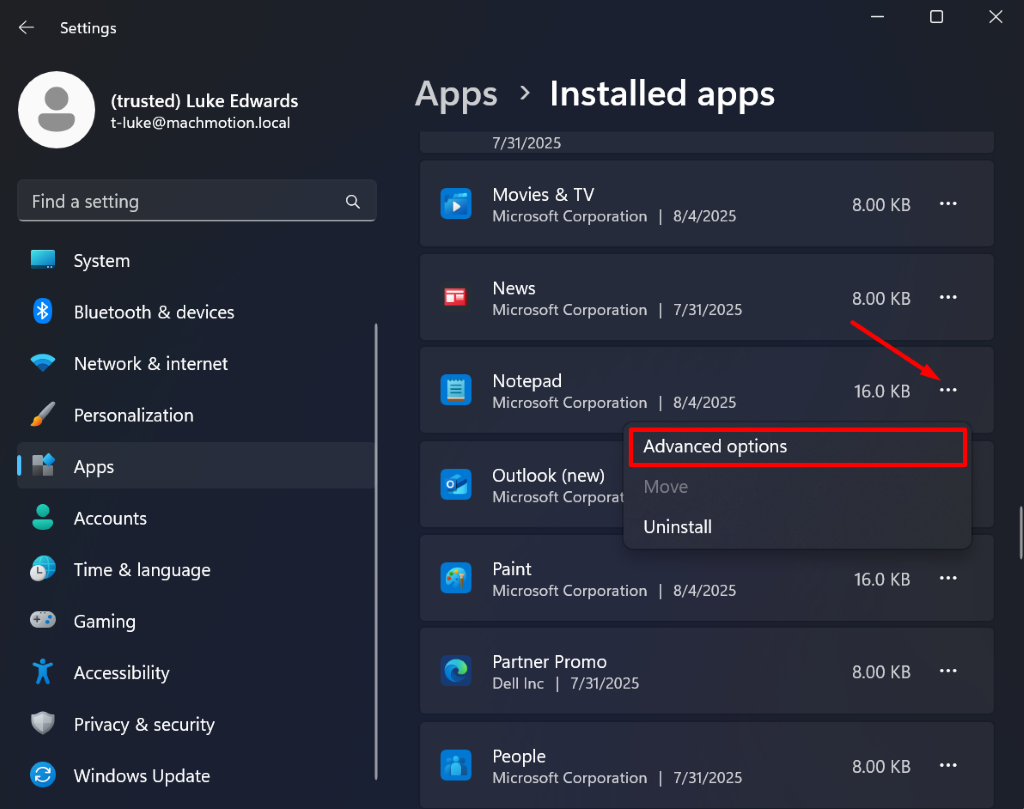
    1. Find the app(s) that isn't working and hit the three dots in the corner and hit advanced options 

  4. Settings 
X 
(trusted) Luke Edwards 
Apps > Installed apps 
t-luke@machmotion.local 
7/31/2025 
Find a setting 
Q 
Movies & TV 
Microsoft Corporation | 8/4/2025 
8.00 KB 
... 
System 
News 
Bluetooth & devices 
Microsoft Corporation | 7/31/2025 
8.00 KB 
... 
Network & internet 
Notepad 
Microsoft Corporation | 8/4/2025 
16.0 KB 
... 
Personalization 
Advanced options 
Apps 
Outlook (new) 
Microsoft Corporat 
Move 
Accounts 
Uninstall 
Time & language 
Paint 
Microsoft Corporation | 8/4/2025 
16.0 KB 
... 
Gaming 
Accessibility 
Partner Promo 
Dell Inc | 7/31/2025 
8.00 KB 
... 
Privacy & security 
Windows Update 
People 
Microsoft Corporation | 7/31/2025 
8.00 KB 
...

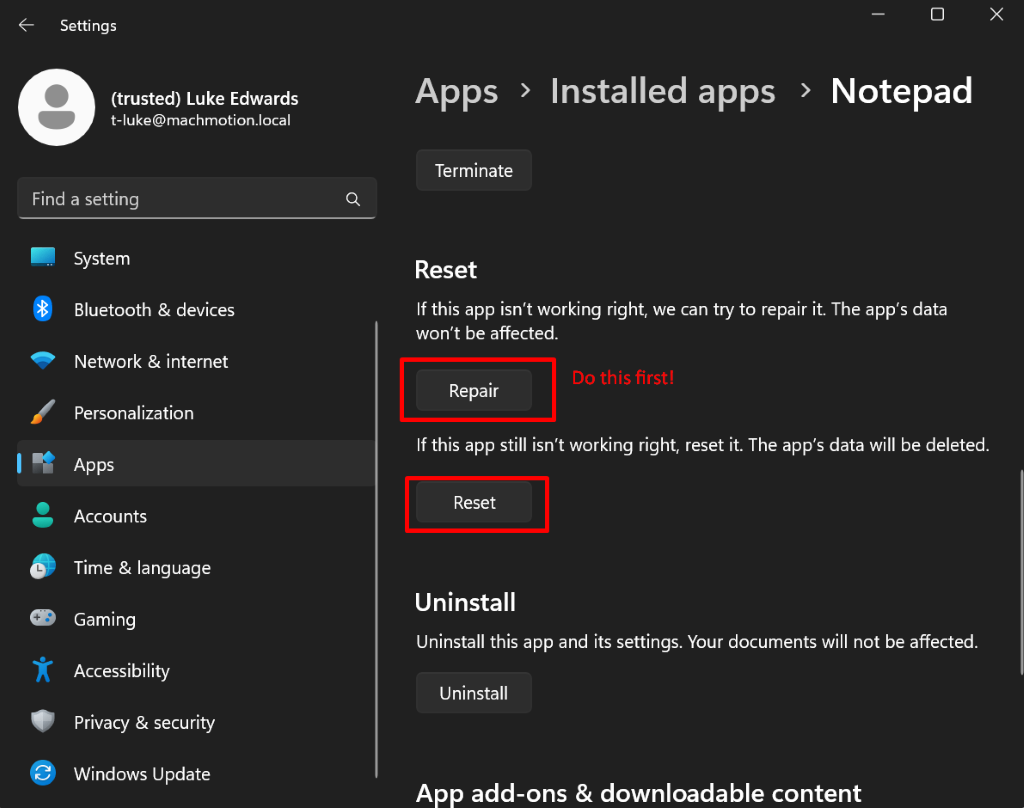
    1. Within advanced options hit repair app and verify if the app is working or not. If not hit reset app, restart the computer then verify if the app is working. 

  5. Settings 
X 
(trusted) Luke Edwards 
Apps > Installed apps > Notepad 
t-luke@machmotion.local 
Terminate 
Find a setting 
Q 
System 
Reset 
Bluetooth & devices 
If this app isn't working right, we can try to repair it. The app's data 
won't be affected. 
Network & internet 
Repair 
Do this first! 
Personalization 
If this app still isn't working right, reset it. The app's data will be deleted. 
Apps 
Accounts 
Reset 
L 
Time & language 
Uninstall 
Gaming 
Uninstall this app and its settings. Your documents will not be affected. 
Accessibility 
Uninstall 
Privacy & security 
Windows Update 
App add-ons & downloadable content

  6. Run sfc /scannow in the terminal. This is good to run even if resetting and repairing the app worked 

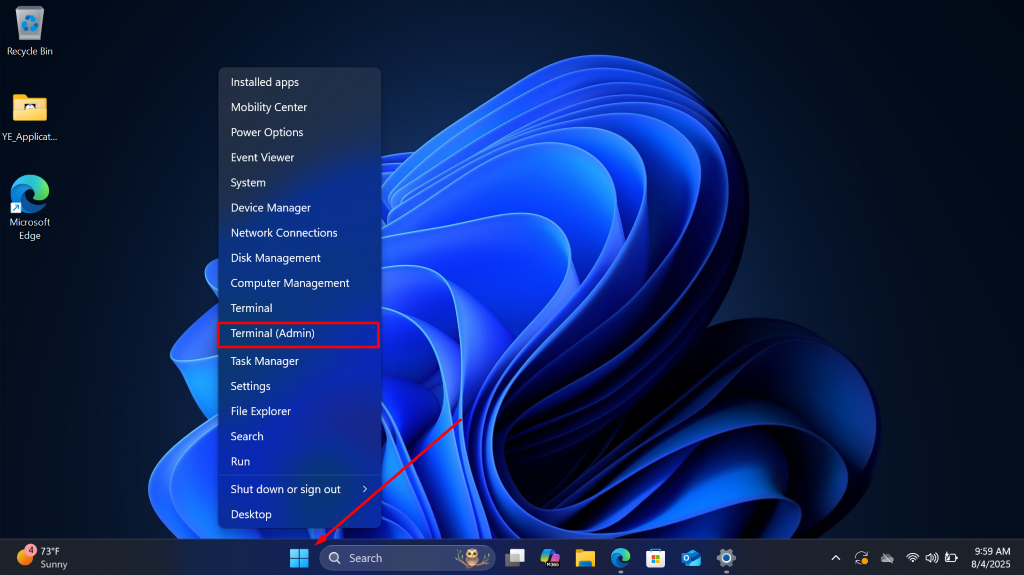
    1. Right click the windows button and click Terminal admin 

  7. Recycle Bin 
Installed apps 
Mobility Center 
YE_Applicat ... 
Power Options 
Event Viewer 
System 
7 
Device Manager 
Microsoft 
Edge 
Network Connections 
Disk Management 
Computer Management 
Terminal 
Terminal (Admin) 
Task Manager 
Settings 
File Explorer 
Search 
Run 
Shut down or sign out 
Desktop 
4 
73ºF 
9:59 AM 
Q 
Search 
V. 
O 
1 
Sunny 
M365 
8/4/2025

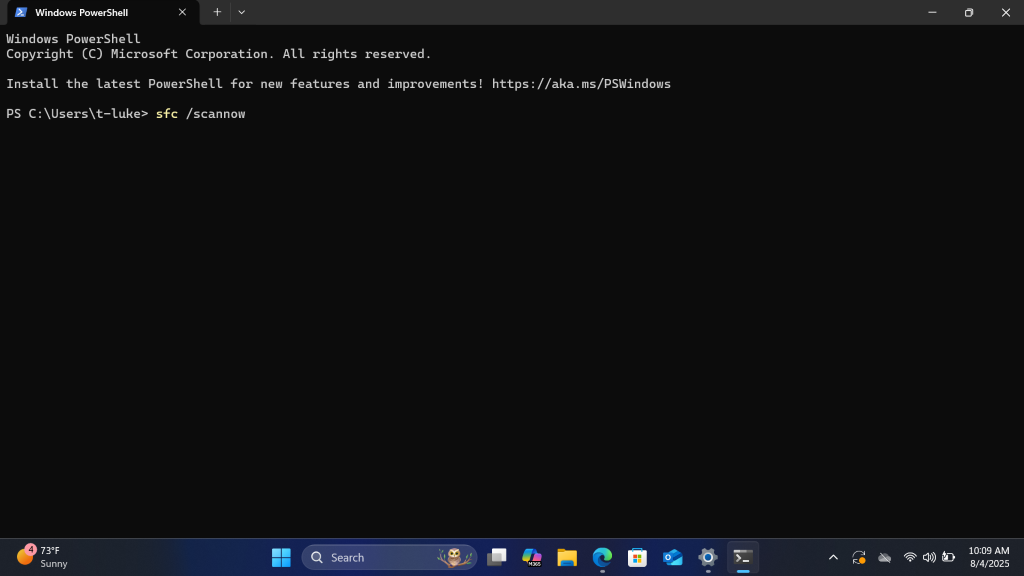
    1. Type sfc /scannow 

  8. Windows PowerShell 
X 
+ 
V 
X 
Windows PowerShell 
Copyright (C) Microsoft Corporation. All rights reserved. 
Install the latest PowerShell for new features and improvements! https: //aka.ms/PSWindows 
PS C: \Users\t-luke> sfc /scannow 
73ºF 
10:09 AM 
O 
Sunny 
Q Search 
1 
M365 
8/4/2025

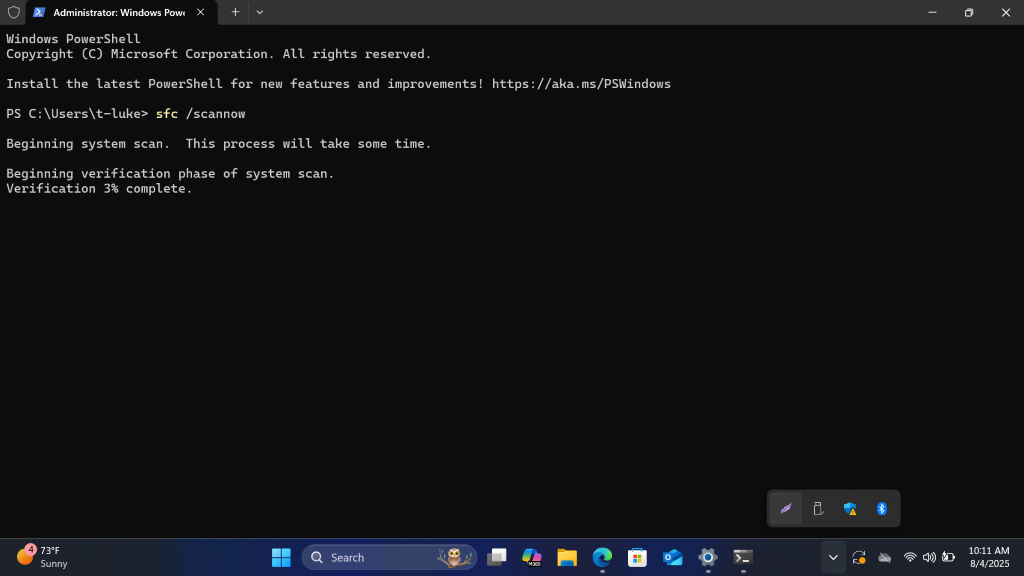
    1. Hit enter and wait, may take a few minutes 

  9. Administrator: Windows Pow 
X 
+ 
V 
0 X 
Windows PowerShell 
Copyright (C) Microsoft Corporation. All rights reserved. 
Install the latest PowerShell for new features and improvements! https: //aka.ms/PSWindows 
PS C: \Users\t-luke> sfc /scannow 
Beginning system scan. 
This process will take some time. 
Beginning verification phase of system scan. 
Verification 3% complete. 
73ºF 
Sunny 
Q Search 
10:11 AM 
O 
V 
M365 
8/4/2025

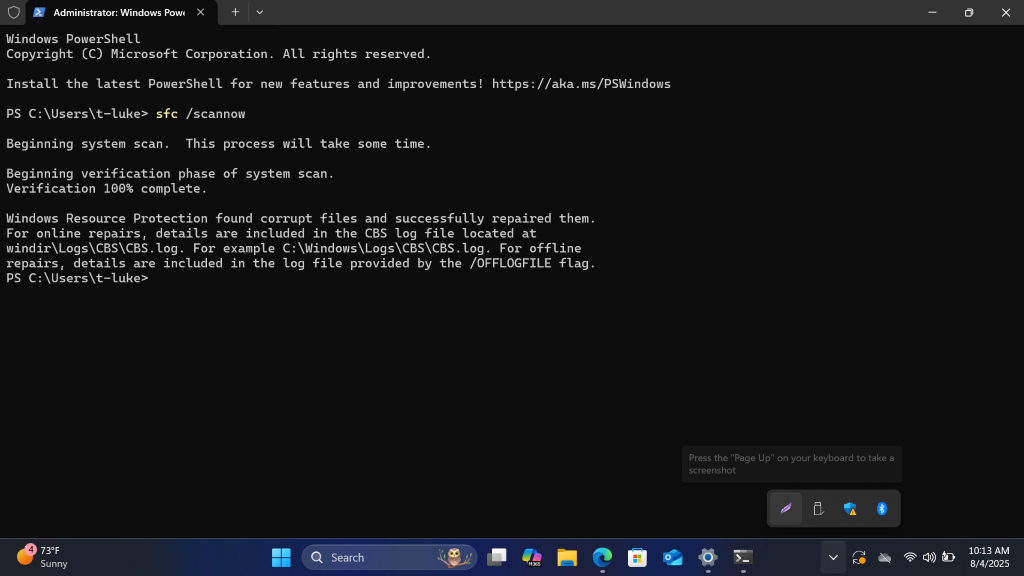
    1. Once completed read the message it left behind and act accordingly  

  10. Administrator: Windows Pow( X 
+ 
V 
0 X 
Windows PowerShell 
Copyright (C) Microsoft Corporation. All rights reserved. 
Install the latest PowerShell for new features and improvements! https: //aka.ms/PSWindows 
PS C: \Users\t-luke> sfc /scannow 
Beginning system scan. This process will take some time. 
Beginning verification phase of system scan. 
Verification 100% complete. 
Windows Resource Protection found corrupt files and successfully repaired them. 
For online repairs, details are included in the CBS log file located at 
windir\Logs\CBS\CBS. log. For example C: \Windows\Logs\CBS\CBS.log. For offline 
repairs, details are included in the log file provided by the /OFFLOGFILE flag. 
PS C: \Users\t-luke> 
Press the "Page Up" on your keyboard to take a 
screenshot 
73ºF 
10:13 AM 
Sunny 
Q Search 
O 
V 
M365 
8/4/2025

  11. Run dism in windows terminal. This is good to run even if resetting and repairing the app worked 

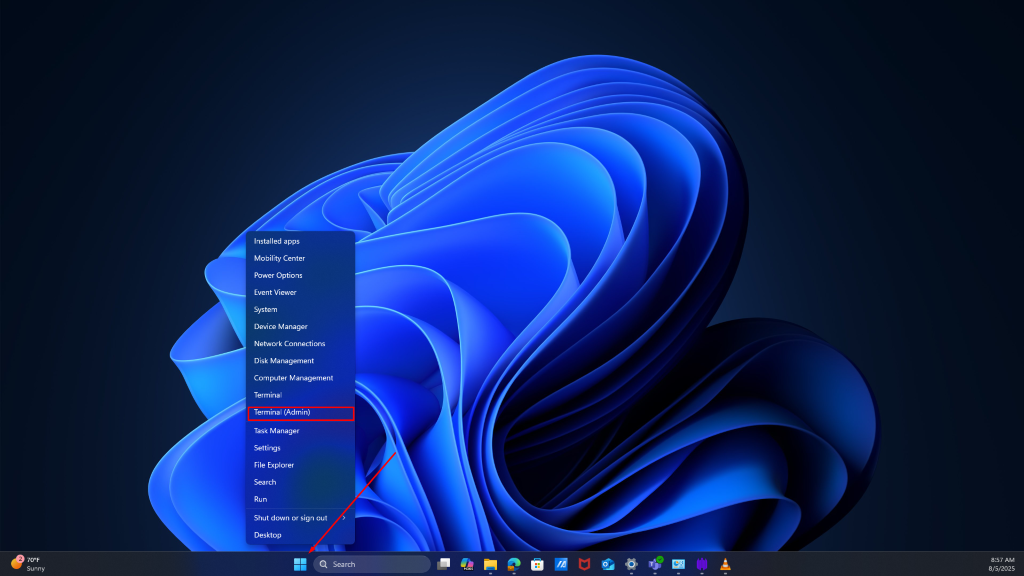
    1. Right click the windows button and click Terminal admin 

  12. Installed apps 
Mobility Center 
Power Options 
Event Viewer 
System 
Device Manager 
Network Connections 
Disk Management 
Computer Management 
Terminal 
Terminal (Admin) 
ask Manager 
Settings 
File Explorer 
Search 
Run 
Shut down or sign out 
Desktop 
8:57 AM 
2 
70ºF 
Q Search 
M 
8/5/2025 
Sunny

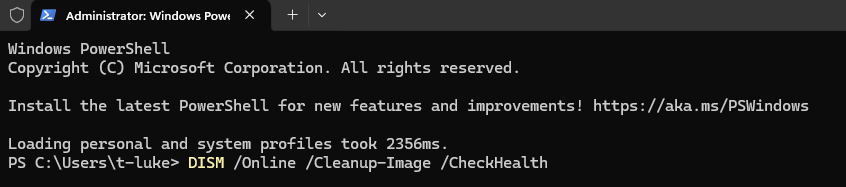
    1. Type  DISM /Online /Cleanup-Image /CheckHealth then hit enter 

  13. Administrator: Windows Powe 
X 
+ 
Windows Powershell 
Copyright (C) Microsoft Corporation. All rights reserved. 
Install the latest PowerShell for new features and improvements! https: //aka.ms/PSWindows 
Loading personal and system profiles took 2356ms. 
PS C: \Users\t-luke> DISM /Online /Cleanup-Image /CheckHealth

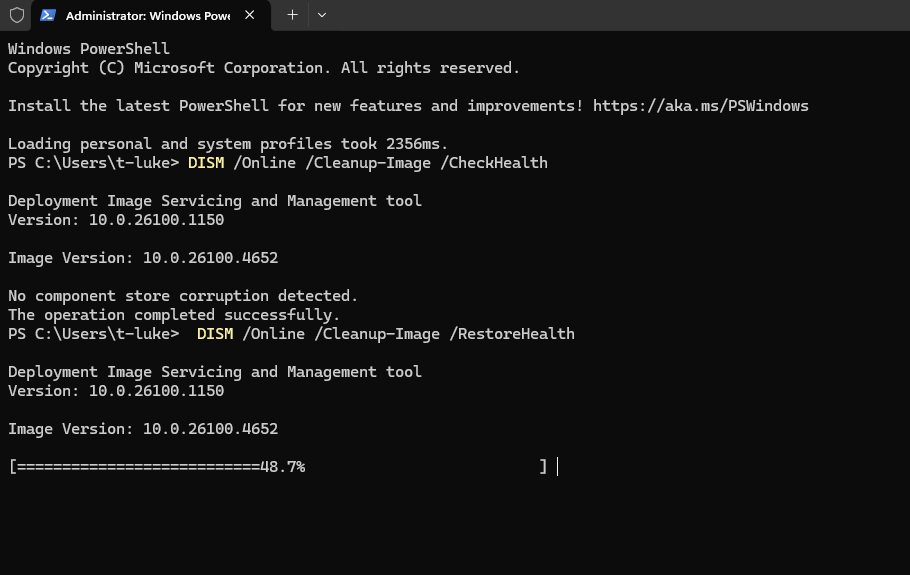
    1. Verify if it detected corruption or not 

    2. If it did type DISM /Online /Cleanup-Image /RestoreHealth the verify it repaired the corrupted files 

  14. Administrator: Windows Powe 
× 
+ 
Windows Powershell 
Copyright (C) Microsoft Corporation. All rights reserved. 
Install the latest PowerShell for new features and improvements! https: //aka.ms/PSWindows 
Loading personal and system profiles took 2356ms. 
PS C: \Users\t-luke> DISM /Online /Cleanup-Image /CheckHealth 
Deployment Image Servicing and Management tool 
Version: 10.0.26100.1150 
Image Version: 10.0.26100.4652 
No component store corruption detected. 
The operation completed successfully. 
PS C: \Users\t-luke> DISM /Online /Cleanup-Image /RestoreHealth 
Deployment Image Servicing and Management tool 
Version: 10.0.26100.1150 
Image Version: 10.0.26100.4652 
====== 48.7%

  15. Reset the device  

    1. Backup important files  

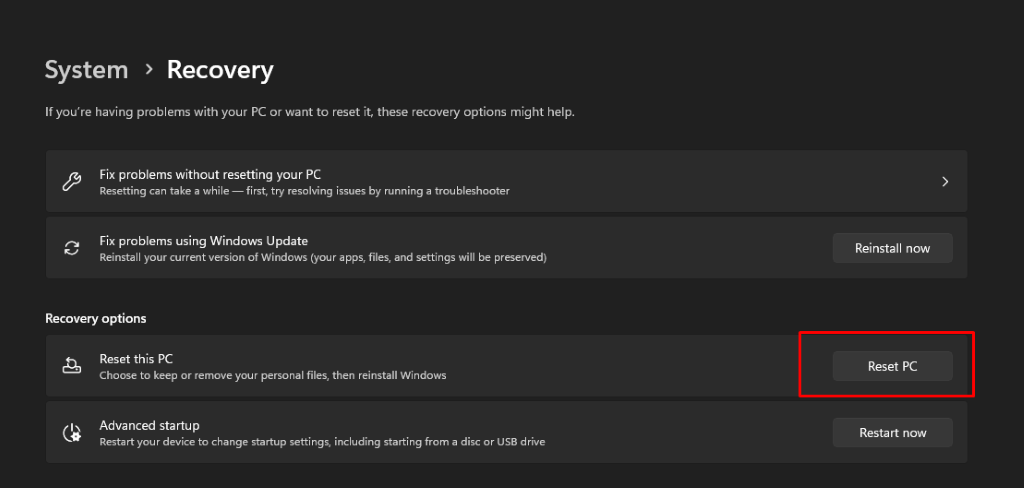
    2. Reset the device system > recovery > reset this pc 

    3. System > Recovery 
If you're having problems with your PC or want to reset it, these recovery options might help. 
Fix problems without resetting your PC 
Resetting can take a while - first, try resolving issues by running a troubleshooter 
> 
Fix problems using Windows Update 
Reinstall your current version of Windows (your apps, files, and settings will be preserved) 
Reinstall now 
Recovery options 
Reset this PC 
Choose to keep or remove your personal files, then reinstall Windows 
Reset PC 
Advanced startup 
Restart your device to change startup settings, including starting from a disc or USB drive 
Restart now