
Lua Training
What is Lua? Lua is a powerful, efficient, lightweight, embeddable scripting language. It supports procedural programming, object-oriented programming, functional programming, data-driven programming, and data description.
Reference Information
For programming, start by checking out Mach4 in SVN. See the steps here: Download and install latest TortoiseSVN
For reference, use the files located in the Mach4 SVN checkout.
Mach4_Development\SDK\Include:
- All API calls start with MC.
MachAPI.h
- Constants
Mach4_Development/Modules:
- Wrapper Module.lua
- CommonGUIModule.lua
- Other Modules.
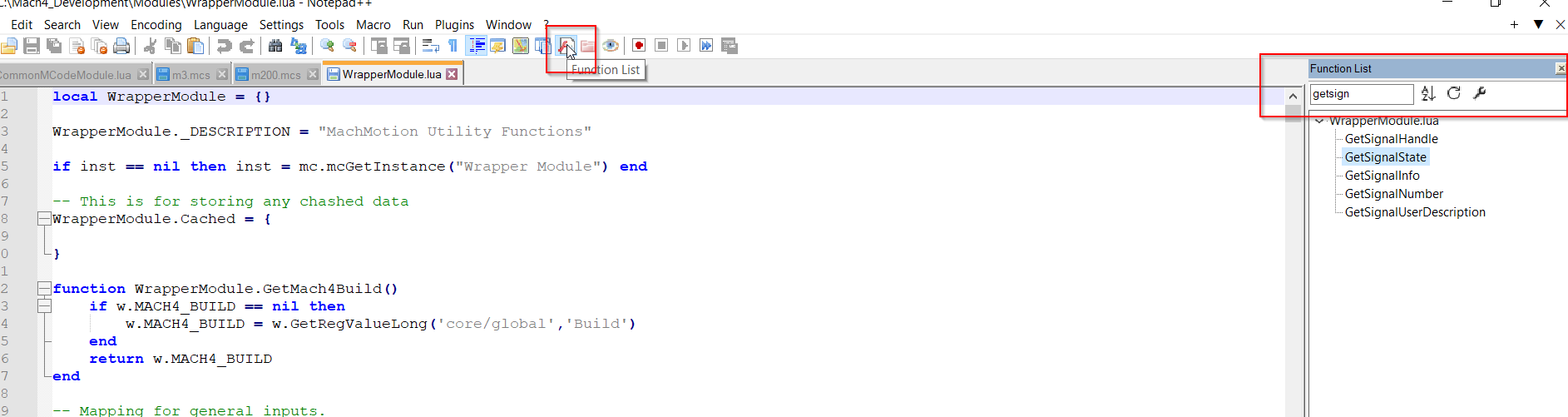
To search functions, enable Function list and then search for what you are looking for.
Macros
Macros are called from MDI or gcode.
Screen
Never do a sleep because it will freeze up the entire Mach4 folder.
Custom Scripts
Under the profile you are running, open Macros/Scripts. Remove the Default from the name of the script you want to run and then recompile modules in Mach4.
UserGUIModuleDefault.mcs
- UserGUIPLCScript() runs about every 2 milliseconds
- Any function hook
- UserGUIModule.CreateUserCommands()
- Use this to create custom functions that can be called by function buttons on the screen.
func_name = "Test Analog Feedback"
w.CreateCommandActionOption(func_name, function(from_opr_panel) user.CheckRandom() end)
w.CreateCommandFeedbackOption(func_name, function() return user.AnalogCheck() end)
w.CreateSimpleCommand(func_name)
UserMcodeModuleDefault.mcs
- Any mcode
- Any mcode hook