
Teco Drive Power Conversion Kit-GS2
To help convert the incoming power lines for the teco drives from the older style TSTA to the new style GS2, use the conversion kit, part # 1234567.
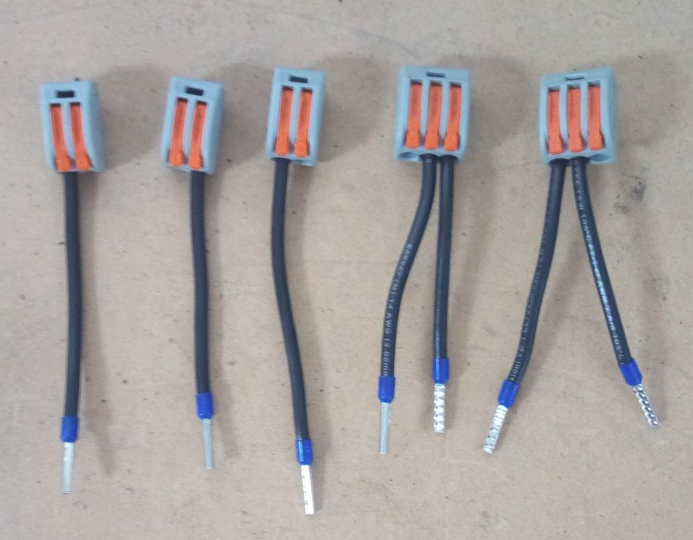
The kit contains 5 pre-wired lever nuts (or similar) and can be used for Apollo I setup (r,s jumpered from R,S) or Apollo III setup (different lines for each). Will work for single phase or 3-phase as well.
Ensure power is off and confirm no voltage is present with a volt-meter before performing the conversion. Failure to do so may result in DEATH, INJURY, or serious PROPERTY DAMAGE.
Kit Contents:
TSTA Teco Drive Terminals:

GS2 Teco Drive Terminals:
To use these connections, us a small flat blade screwdriver and push down on the orange block to open the terminal port. Insert wire, then release the orange block. Gently but firmly tug on wire to ensure it is securely fastened.

Apollo I
Typical Apollo I Wiring has R and S jumpered to r and s as shown below. This is L1 and L2 incoming power. For 3-phase systems another wire would be connected to T.

- Ensure no power is present
- Remove jumper wires (r & s to R & S) and set aside
- Cut terminals off incoming power wires (typically to R & S) and strip insulation back 3/8"
- Use one of the 3 wire lever nuts included with kit and connect R (L1) to nut and then one of the pre-wired leads to r and the other to R on the GS2 drive
- Use other 3 wire lever nut included with kit and connect S (L2) to nut and then one of the pre-wired leads to r and the other to R on the GS2 drive
- If 3-phase, cut the terminal from the T wire, strip back 3/8" insulation and connect to T of the GS2 drive.
Apollo III