
MachPro M31 Absolute Encoder
{{@2007#bkmrk--1}}
Initial doc: 2026-05-08-T15-55
testing and revision:
release to public:
Both servos and steppers can be supported as long as they have:
- encoders
- a way to retain the encoder count when the system is powered down
- EtherCat communication with the M31
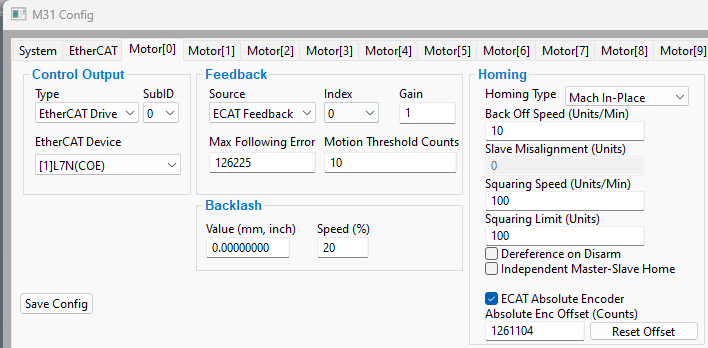
First configure
- Control output as a specific EtherCat Drive/device
- The Feedback source as ECAT Feedback
- The homing method
- Check the box next to ECAT Absolute Encoder at the bottom of the homing column
- Click OK to save your changes and close the M31 Config Plugin
- Go to the service tab and home the axis using the motor you just configured.
TheCaution - unless you have set the homing method to home in place, the axis will move to the home switch. When the system has homed that axis, the homing process will enter the correct encoder count into the Absolute Enc Offset (Counts) field on the M31 Config tab.
If you have hadhome hardwareswitches changes(good orfor repairs,you!) youthen mayyou'll need to re-calibratede-reference, yourhome, Absoluteand Encit Offset.should input the new value when it completes the home cycle.
- Go to the service tab and click on the CMDS button
- Filter for Deref, select your axis and click OK. That will clear the Absolute Enc Offset value
- Now rehome that axis from the service tab
AlternatelyIf you do not have home switches (gasp!) then you need to do your best to move that axis back to its home position and then click the reset button. If you have had hardware changes or repairs, you may need to re-calibrate your Absolute Enc Offset.
- Jog the axis to the machine zero position and disable the software
- Open the M31 Plugin Config
- Click the motor that has been modified and click the Reset Offset button. That
shouldwillclearinsert the current encoder count into the Absolute Enc Offset field From the Service tab, rehome that axisTheAbsolute Enc Offsetvalue will be filled with the current value of the encoder on that axis.
{{@2016}}