
remote-02.machmotion.local (Remote Desktop Machine)
This machine serves as a portal for remote desktop access to a computer on the company network.
Setup
- Windows 10 Professional
- vanilla desktop setup
- machmotion.local domain member
- Remote Desktop Users (local group)
- MACHMOTION\Domain Users
- (any domain user should be able to remote into this machine)
Network Setup
- Firewall port opened on Internet gateway (gateway-01.net.machmotion.local)
- TCP:20803
- forwards to 192.168.0.100:20803
- forwards to 172.16.17.21 (remote-02.machmotion.local)
- forwards to 192.168.0.100:20803
- TCP:20803
System Software
RDPWrap
This is a wrapper around MS Terminal Services to allow multiple, simultaneous terminal services connections.
https://github.com/stascorp/rdpwrap
- This solution is sensitive to Windows updates that change termsrv.dll.
- Run a configuration check to verify that everything is OK.
- The configuration INI file will probably need to be updated for any updates to termsrv.dll.
- If an update breaks the ability to have simultaneous connections, look for a new issue.
- Usually, the fix is to add version specific information to the configuration file.
- Once the configuration file has been updated, terminal services needs to restart. A reboot is probably overkill, but will do the job.
- If an update breaks the ability to have simultaneous connections, look for a new issue.
- The configuration INI file will probably need to be updated for any updates to termsrv.dll.
Configuration Check
C:\Program Files\RDPWrap-v1.6.2\RDPConf.exe
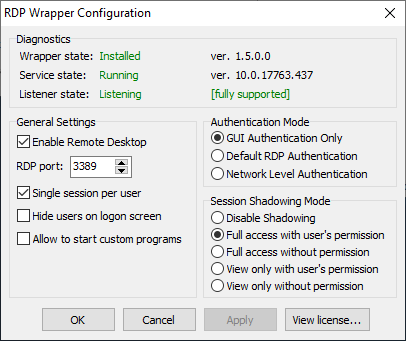
If "[fully supported]" isn't shown, then the wrapper doesn't know how to handle this version of termsrv.dll.
If "Wrapper state" isn't "Installed", then you'll probably need to run the install script again.
Configuration File
C:\Program Files\RDP Wrapper\rdpwrap.ini
Each section in the file corresponds to a version of the termsrv.dll file.
Each version of the file has two sections.
- <version>-SLInit
- <version>